Alert Settings
Settings ▸ System Administration ▸ Alerts controls how alerts behave for everybody. Individual preferences — popups, sounds, Auto-Follow — are set per user and are covered in Alert Preferences.
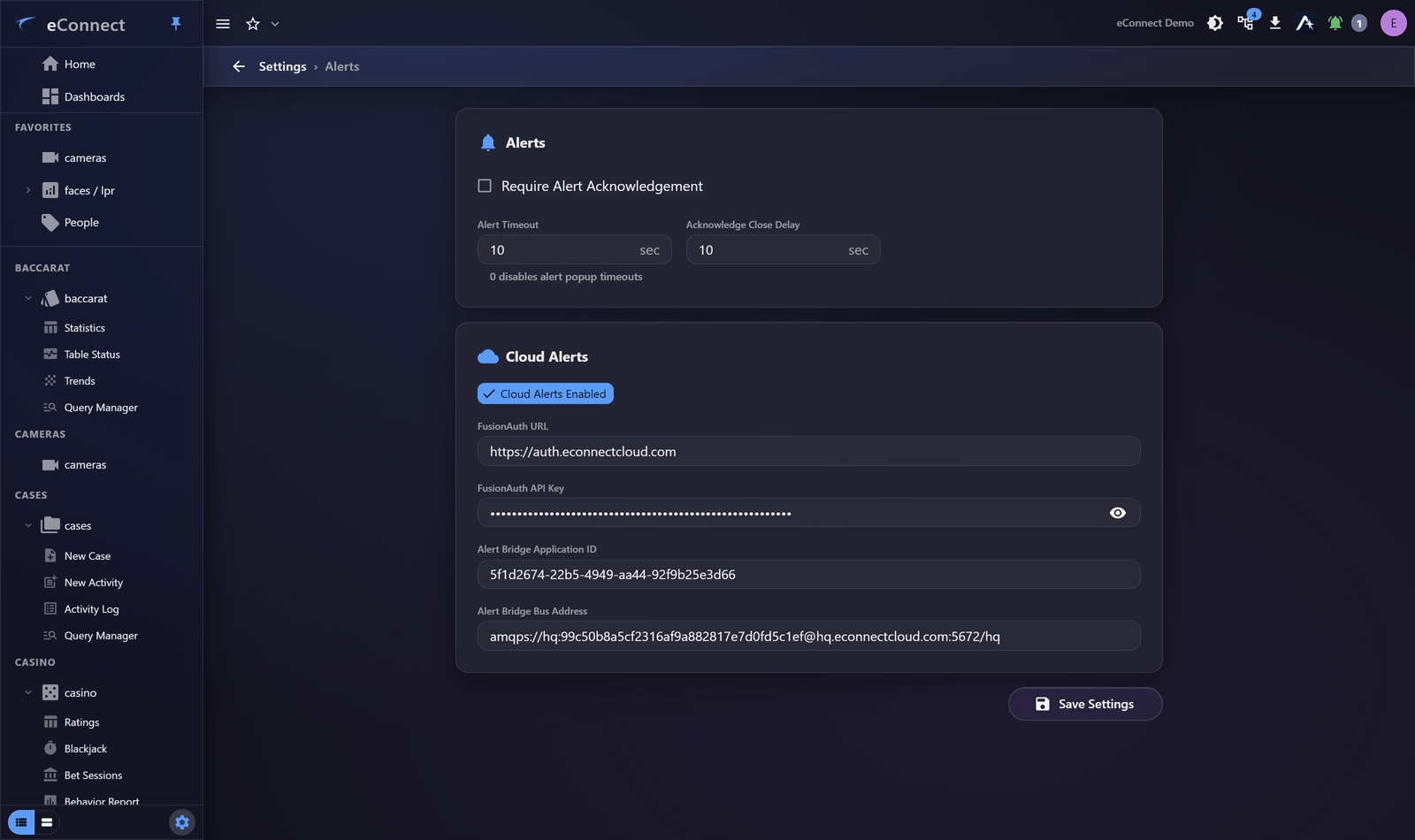
The settings
| Setting | Effect |
|---|---|
| Alert notifications | Whether alerts are delivered at all |
| Require Alert Acknowledgement | Alerts must be answered rather than allowed to lapse |
| Acknowledge Close Delay | How long an acknowledged alert stays visible before closing |
| Alert Timeout | How long an unanswered alert remains open |
Require acknowledgement
This is the setting with the most consequence, and it is a policy decision rather than a technical one.
On, every alert waits for a person and is recorded as acknowledged or ignored, by name. The alert history becomes a record of decisions, which is what supports a later claim that something was assessed.
Off, alerts can lapse unanswered. Less friction on a busy floor, and no evidence that anybody looked.
Turn it on where alerts matter enough to review afterwards. That is most places using face or plate recognition for anything consequential.
Acknowledge close delay
How long an acknowledged alert remains on screen. A few seconds lets an operator confirm they acted on what they meant to; longer than that and acknowledged alerts clutter the tray.
Operators can hold an individual alert open with Keep this alert active or Cancel auto-close when they need longer, so this setting is about the common case rather than every case.
Alert timeout
How long an unanswered alert stays open. Too short and alerts vanish before anyone reaches them during a busy period; too long and the tray fills with alerts nobody will act on now.
Match it to how quickly your floor actually responds. If operators routinely find alerts already gone, it is too short.
Cloud alerts and the alert bridge
Where alerts are delivered beyond eConnect itself, the bridge and identity settings on this page configure that connection. These are integration settings — get them from whoever set up the integration rather than guessing, since a wrong value here fails silently.
Before you change anything
Alert behaviour is felt immediately by every operator, and changes are noticed within minutes.
- Turning acknowledgement on changes what people must do. Tell them first.
- Shortening a timeout makes alerts disappear sooner, which reads as alerts being missed.
Change one setting at a time.
If alerts are being ignored
Alert fatigue is a configuration problem, not a discipline problem. When operators dismiss alerts reflexively, the cause is almost always too many low-value alerts — usually a tag applied more broadly than it should be.
Look at the tags generating them: face tags and plate tags. Fewer, better-targeted alerts get acted on; more alerts do not.
What is recorded
Changes here are audited under the user-group administration type. Alert actions themselves — acknowledged, ignored, muted — are audited per user; see Acknowledging and Ignoring.