Starter Prompts
A blank chat box is a hard place to start. Ace opens a new conversation on a list of starter prompts — the questions your own organisation has decided are worth asking, grouped by the module they belong to.
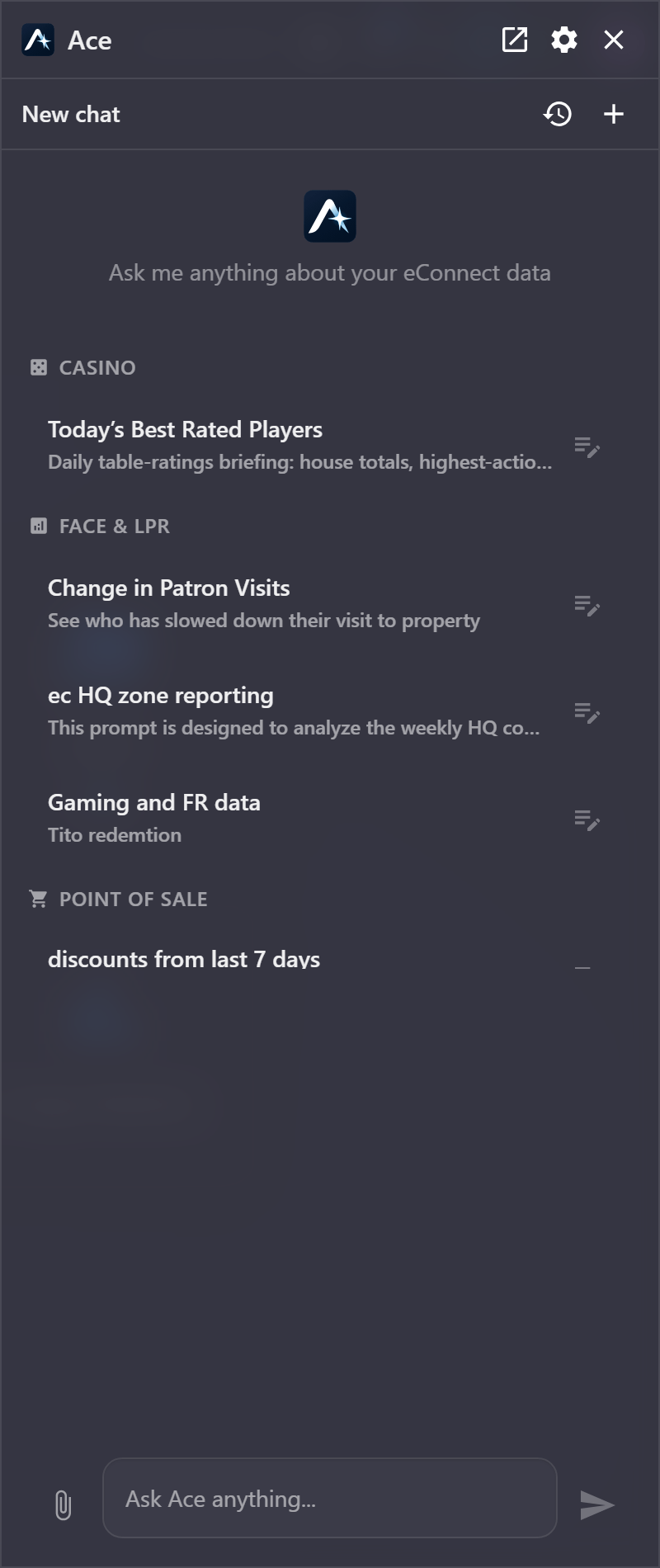
These are not examples supplied with the product. They are written by people at your site, they can be edited and shared, and they grow as your team works out which questions are actually useful.
Using one
Click a prompt and it is sent. There is no intermediate step — the question goes to Ace exactly as written, and the answer starts arriving.
Where you want the question nearly as written, click the pencil at the end of the row instead. That loads the prompt into the composer without sending it, so you can change the date range, the revenue centre, or whatever else needs to differ this time.
The title is what the prompt is called; the line beneath it says what it does. Hover a row to see the full text of the question it will ask, which is worth doing the first time you use an unfamiliar one.
Finding one
Prompts are grouped under the module they came from — Point of Sale, Casino, Face & LPR — with prompts that belong to no particular module gathered under General.
Once there are more than ten, a text filter and a row of module chips appear above the list. The filter matches the title and the description, so a word you remember from either will find it.
You only see prompts from modules you have access to. A prompt for a module you are not licensed for or not permitted to see is not in your list at all.
Private and shared prompts
A prompt marked Private is yours alone: it carries a padlock in the list and nobody else sees it. Everything else is shared with everyone who can reach that module.
That distinction is worth using deliberately. A half-finished question you are still tuning belongs private; one that has proved itself belongs shared, where it saves everybody else the work of reinventing it.
Writing one
Starter prompts are managed in the Query Manager of the module they belong to, alongside that module's saved queries — see Query Manager. A prompt has:
| Field | What it is |
|---|---|
| Name | The title in the list, up to 80 characters |
| Description | The line beneath it, up to 200 characters |
| Prompt | The question itself, up to 4,000 characters |
| Status | Active prompts are offered; inactive ones are kept but hidden |
| Private | Yours alone, or shared with everyone who can reach the module |
Where you are not permitted to publish prompts for others, Private is set and cannot be cleared — the server would enforce it in any case, so the editor shows the outcome rather than letting you save something that would be overridden.
A prompt can be cloned, which is usually the fastest way to write a new one: start from the closest thing that already works, change what differs, and save it under a new name.
What makes a good prompt
The prompts that survive are the ones that ask a question rather than describe a wish.
- Name the period. "this past week", "yesterday", "the last 30 days". A prompt without one is answered over whatever Ace decides, which will not be the same thing twice.
- Name what you want ranked or counted. "which employees had the most discounts, by dollar value and by count" is a question with one answer; "discount information" is not.
- Leave the specifics out where they change every time. The date or the revenue centre is what the pencil is for.
- Say what shape you want back where it matters — a table, a chart, a top ten.
A prompt written this way returns the same shape of answer every time it is run, which is what makes it worth keeping.
Changes appear immediately
Prompts are shared as soon as they are saved. A colleague who saves a new shared prompt while your chat is open has it appear in your list without a reload, and one that is deleted or made inactive disappears the same way.
Related
- Using the Chat — asking, following up and stopping an answer
- Query Manager — where prompts and saved queries are kept
- What Ace Can Reach — the data behind an answer