eConnect 11.0 Release Notes
Should you upgrade?
Version 11 is the largest release in the product's history, and the shape of it is simple:
- The Windows Presentation Foundation client is retired. Everything it did is in the new client — see what came across — and the new one is faster with large result sets, detaches views onto other monitors, and ships far more often.
- It also runs in a browser, with nothing installed, on any operating system. The desktop client remains the one to use where live video matters.
- Your server does not change. The same Windows Server and SQL Server you run 10.3 on runs 11.0 — see Requirements.
- Two genuinely new capabilities arrive with it: Ace, which answers questions about your own data in plain language, and Semantic Search, which finds people and vehicles from a description.
The headline changes
An entirely new client
The Windows Presentation Foundation client that eConnect has shipped for over a decade has been retired. In its place is a new application built on Electron — the same technology behind Visual Studio Code and Slack — which lets us build and ship far faster than WPF allowed, and which brings a genuinely modern interface to work you do every day.
The change is not cosmetic. Every module has been rebuilt: cameras, faces and plates, point of sale, cases, casino, baccarat and usage statistics. Views open faster, grids handle far larger result sets, and windows can be detached and moved to a second monitor and put back where you found them.
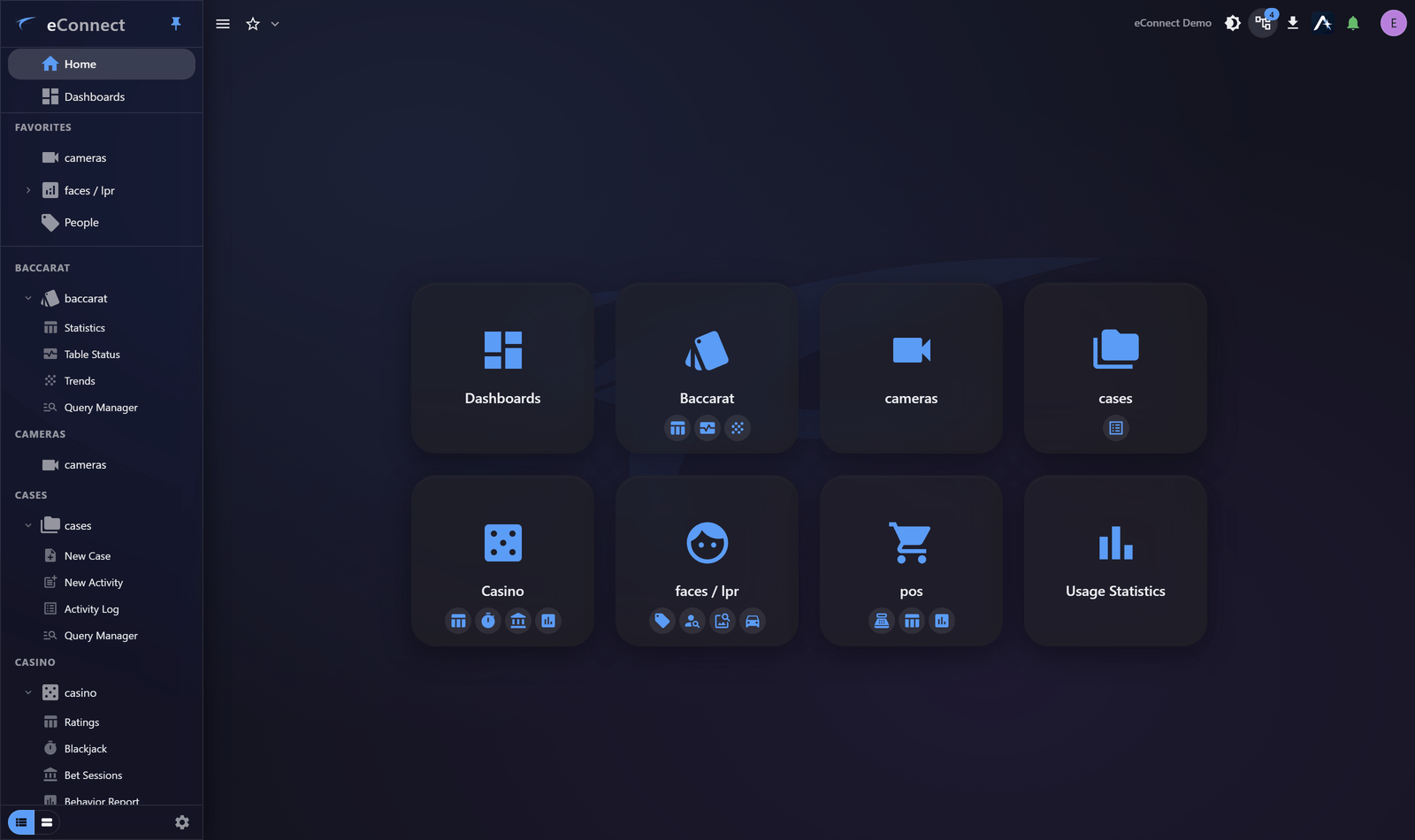
The same application now runs in a browser, with no installation at all. Sign in from a workstation that has never had eConnect on it, from a laptop, or from a machine that is not running Windows. The desktop client remains the right choice where live video matters — see Requirements for what differs.
Ace, the assistant
Every module now has Ace built into it — an assistant that answers questions about your own data, in plain language. Ask which revenue centre had the most voids last night, which subjects visited more than three times this week, or how a table performed across a shift, and get an answer drawn from your live system rather than a general-purpose model's guesswork.
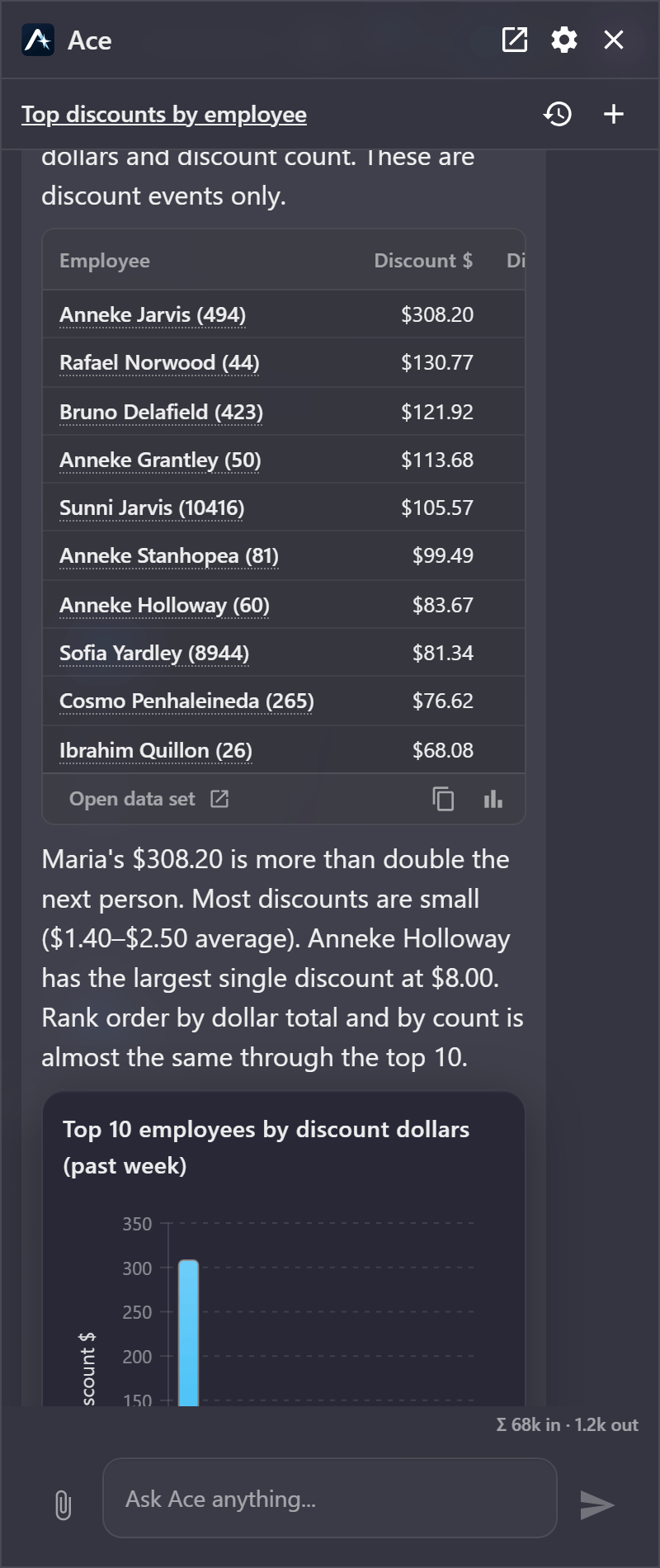
Ace does not just describe — it draws. Answers come back as charts, tables and galleries you can act on: open the evidence behind a figure, pin a chart to a dashboard, or carry the finding into a report. It can search faces from a photograph you attach, produce a PDF, and send it on by email at your request.
Ask it "show me which employees this past week had the most discounts in dollar and total discounts" and it works out which data to fetch, runs the aggregation, and hands back a ranked answer you can act on:
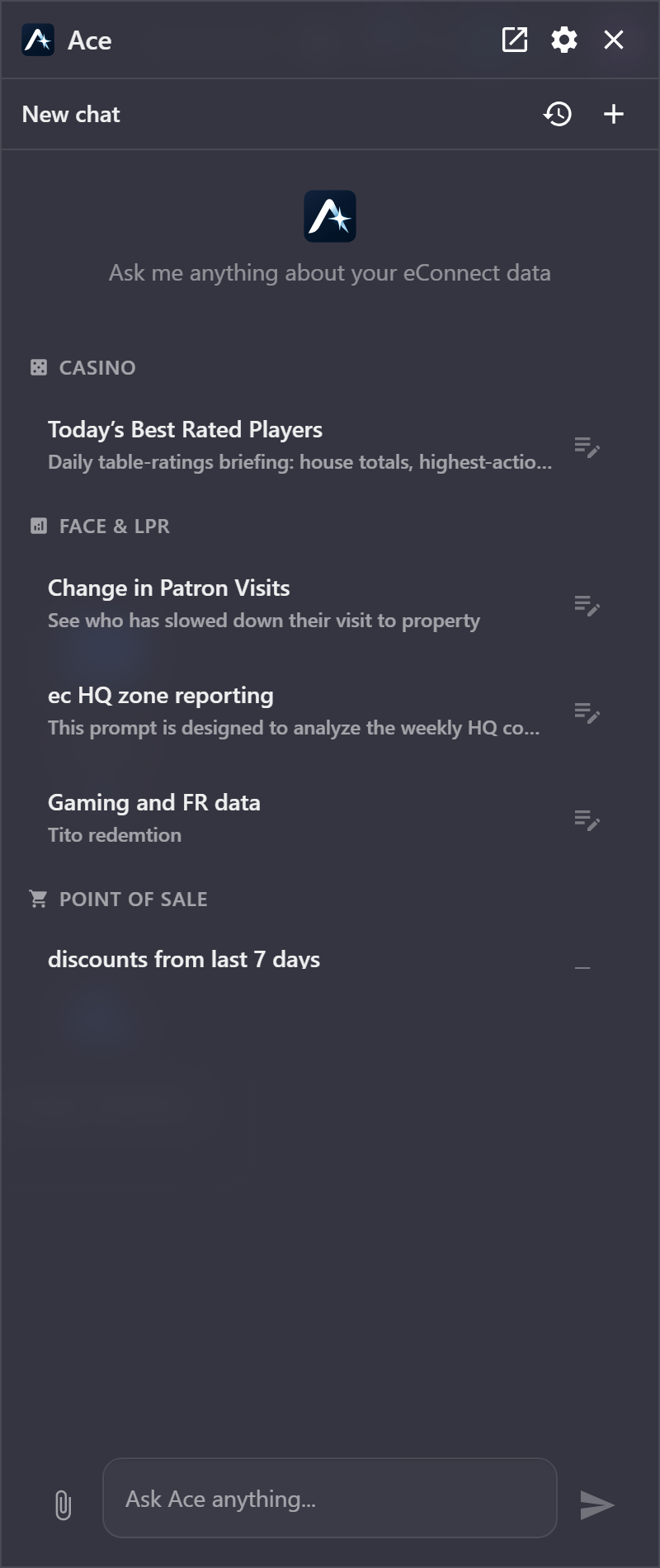
Ace also keeps the questions your organisation already asks. Any saved query can be offered as a starter prompt, grouped by the module it belongs to, so the useful question is one click rather than something each person has to phrase for themselves. Click a prompt to send it; click the pencil beside it to load it into the composer and change it first.
Rows in an answer are live: a figure links back into the grid or receipt it came from, so checking the working is a click rather than a second search.
Crucially, Ace only ever sees what you can see. Its tools are gated by the modules you are licensed for and the permissions you hold, and server-side guardrails prevent camera credentials and personal data from reaching the model. Administrators get full visibility of what it costs and how well it is working.
Semantic Search
Until now, finding someone meant knowing who they were. Semantic Search lets you find people and vehicles by describing them: a red shirt, a purple hat, a red Honda Accord. No enrolment, no plate, no prior identity — just a description of what you are looking for.
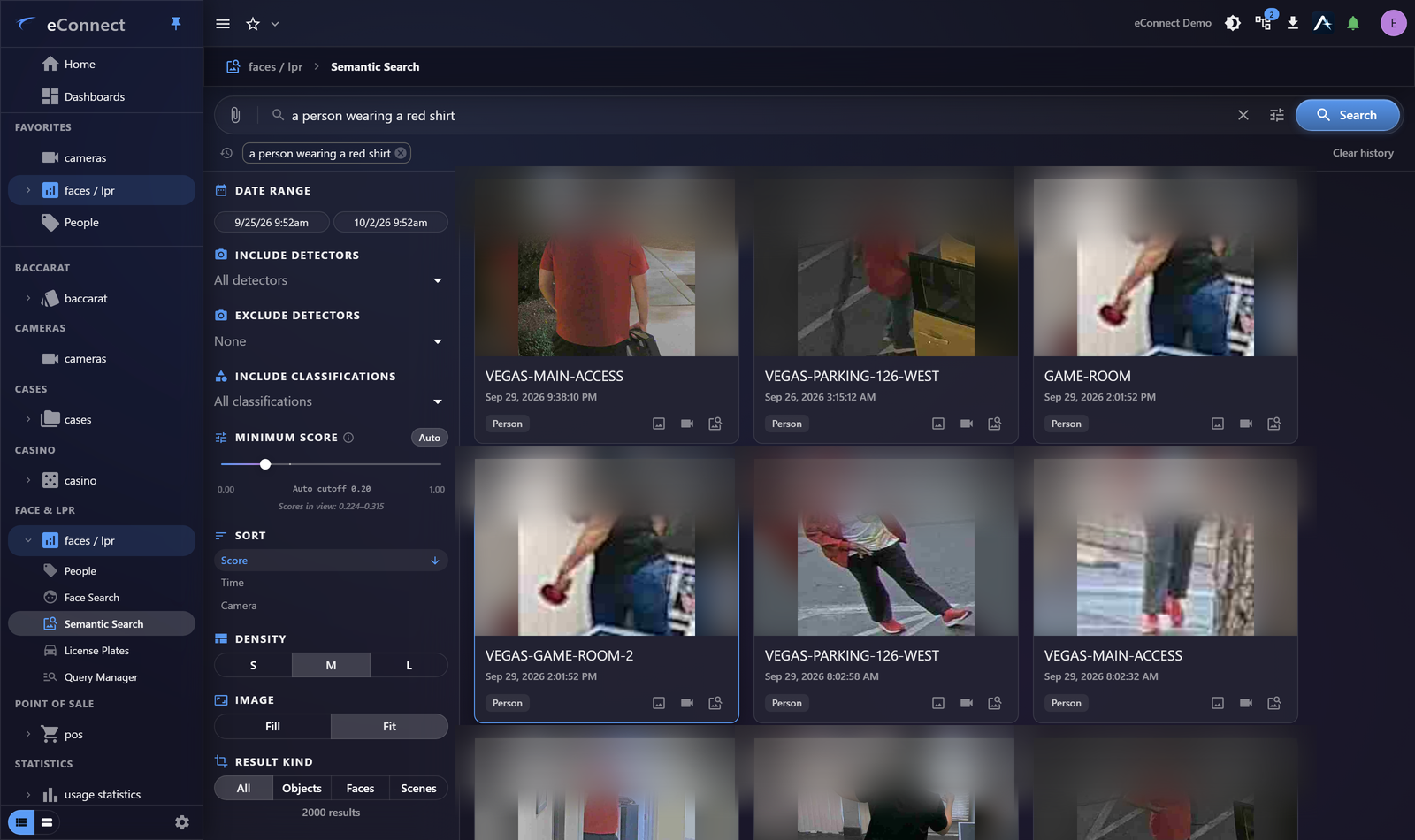
One description is often not enough. Advanced Query takes several things to match and several to steer away from, each carrying its own weight, and blends them into a single search. Look for a person in a red shirt and carrying a backpack, weight the backpack higher, and push high-visibility vests away — the slider between the two lanes decides how hard results lean away from what you are avoiding, and re-ranks instantly as you move it.
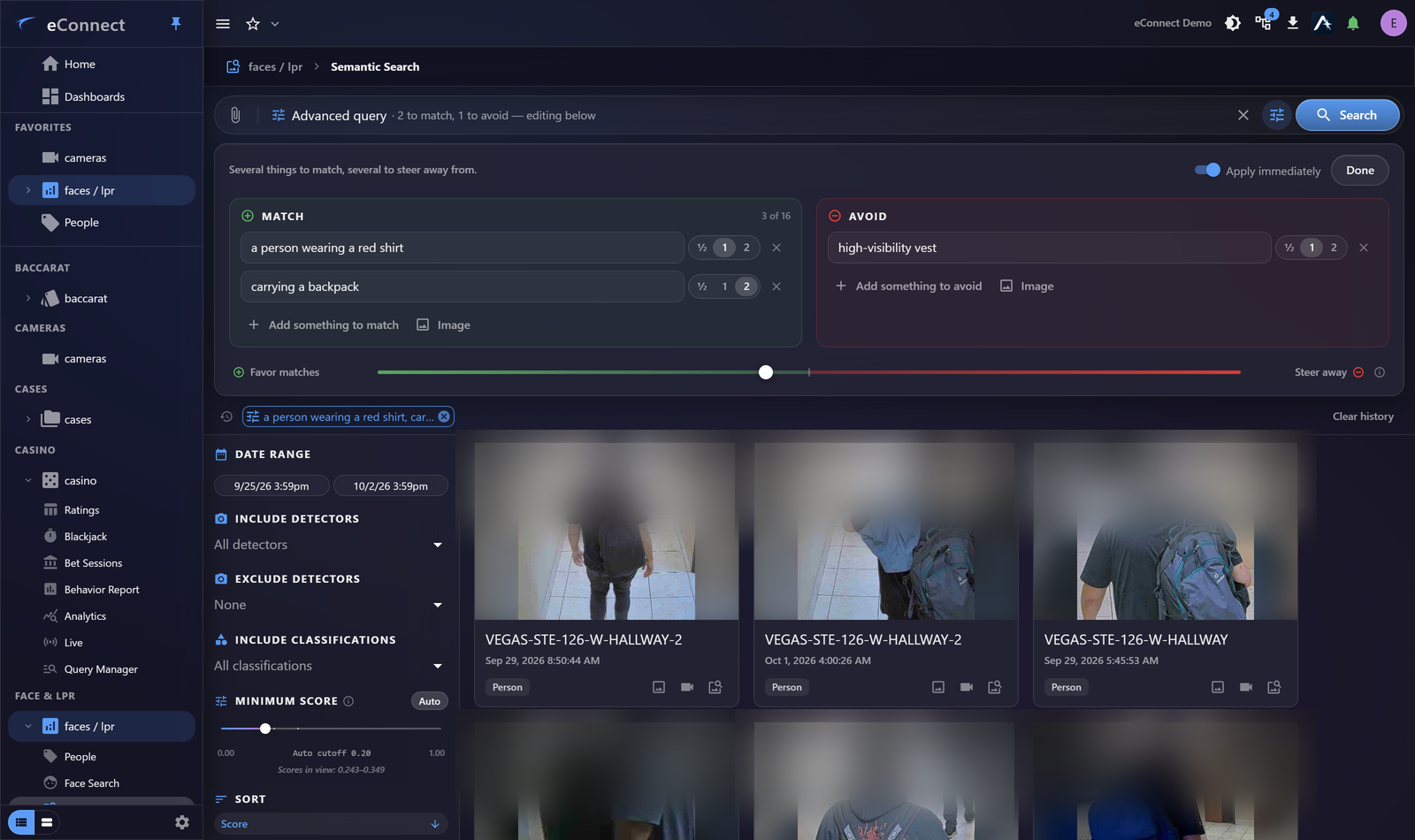
Results narrow by camera, time and confidence, and every match leads straight to the detection and the footage behind it. For the first hours of an incident, when all anyone can tell you is what somebody was wearing, this changes what is possible.
Favorites
The things you use every day are one click from signing in. Star a module, a single view inside one, or whatever you are looking at — a dashboard, a grid you have narrowed to one location and yesterday — and it joins a Favorites list at the top of the navigation drawer, in the order you drag it into.
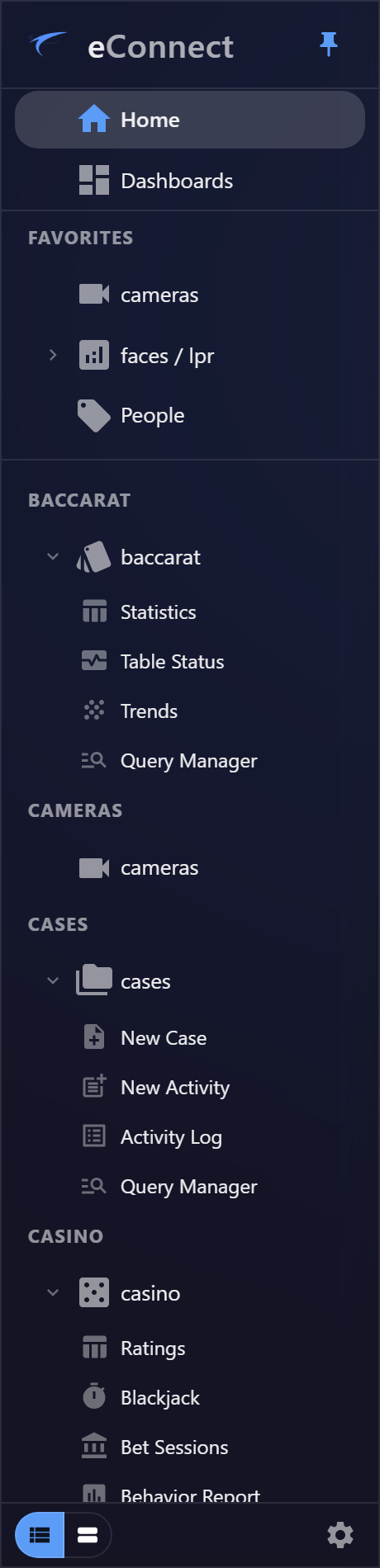
Favorites are stored against your account, not the machine. Sign in at another desk, or in a browser on a machine that has never had eConnect installed, and your arrangement is already there. Pinned grid filters travel the same way.
The Investigation Workspace
Investigations are rarely one query. The new Workspace panel collects what you look at as you look at it — queries, drill-downs, dashboards, cameras and subjects — into a tree you can return to, rather than something you rebuild from memory the next morning.
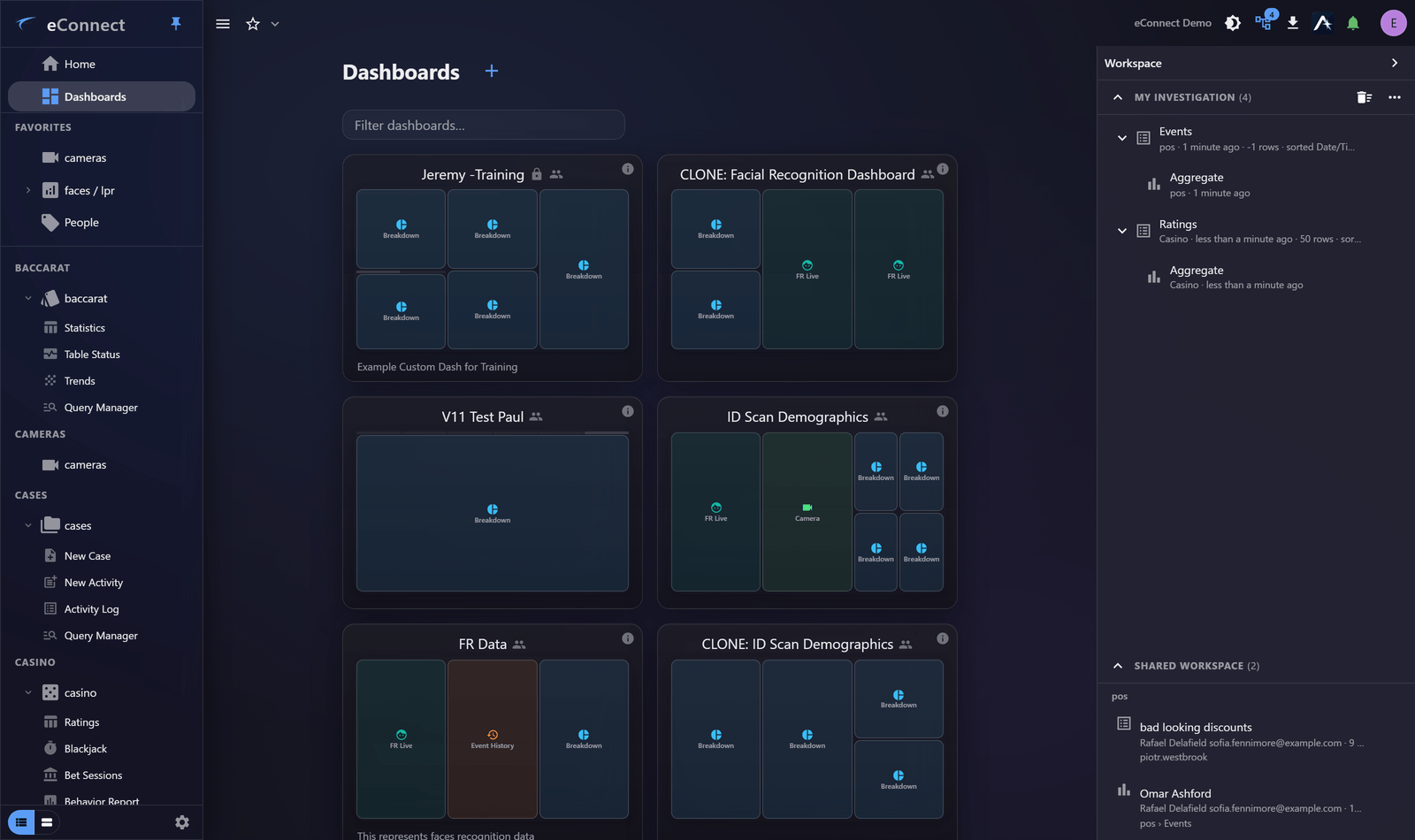
A workspace restores to exactly the state you left it in, and it can be shared with a colleague, who receives the whole line of enquiry rather than a screenshot and an explanation. Anything in it can be opened in a window of its own, a specific dashboard can be pinned to it, and pins now follow you to whichever machine you sign in on.
Security and access reporting
A new Security and Access report produces a point-in-time PDF of who holds which permissions and what they have done, built for access reviews, audits and compliance evidence. Sections the person generating it cannot read are omitted and disclosed on the cover page, so the report is always honest about its own scope.
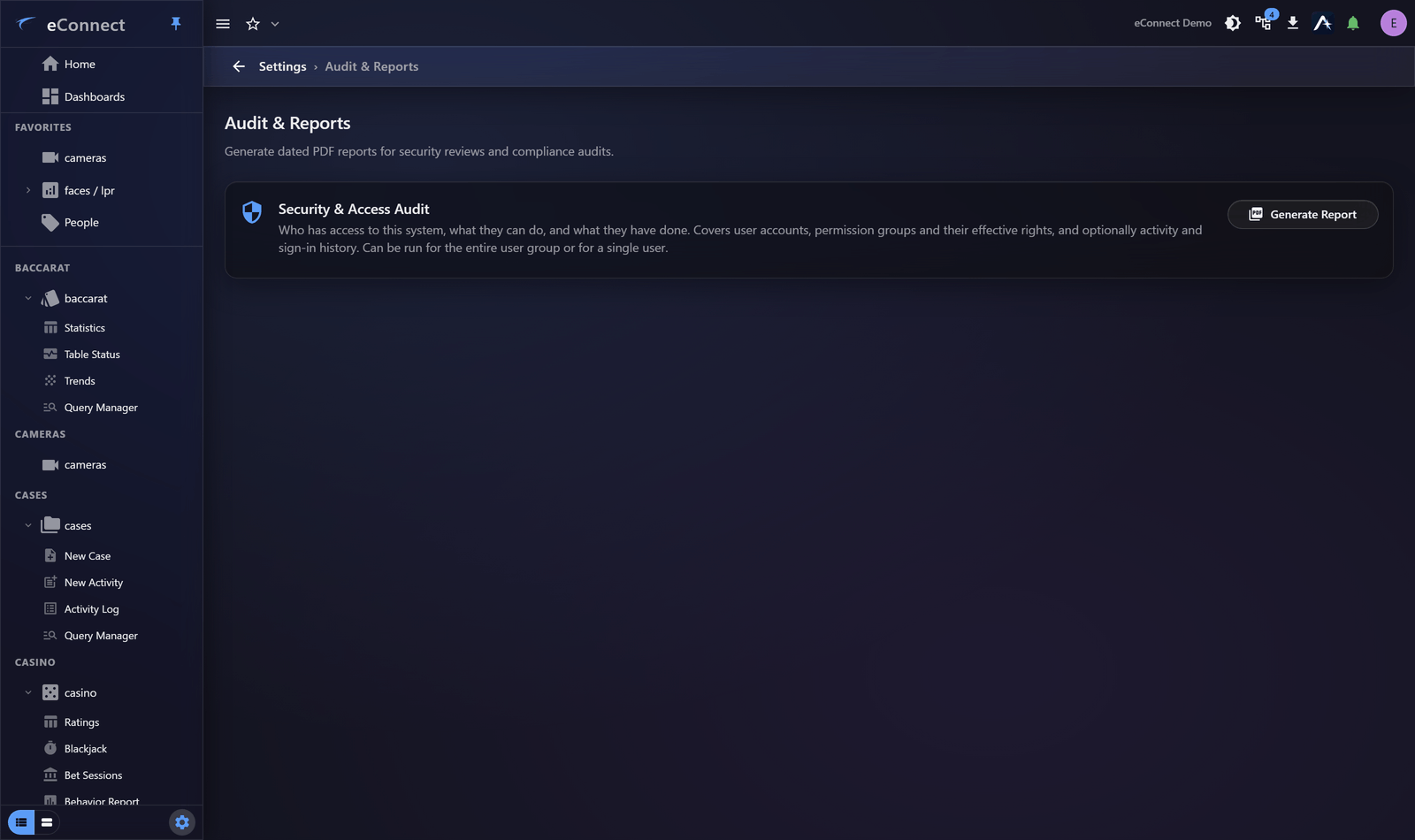
eConnect has always recorded what people do. Version 11 makes that record easier to reach and easier to prove.
Alerts everywhere
Alerts now reach the desktop client, the web client and detached pop-out windows through one engine, with new presentation modes for wall displays and shared screens. Acknowledge, ignore, mute for a period, or let Auto-Follow bring up the cameras and track a subject as fresh detections arrive.
Also in this release
- Similar Faces and server-side merge — find likely duplicate subjects and resolve them in one orchestrated operation that cannot be left half-applied.
- Licence plate PDF reports — plate profiles export as a printable summary, as subject profiles already did.
- Baccarat Trends — a native trends view with a live board, wall display and history.
- Duration of visit — face recognition records how long a subject was observed, and Fusion matching takes that duration into account.
- API v2 — a new REST API with JWT bearer authentication for integrations built on eConnect.
- Dashboard management — dashboards carry properties, can be cloned, exported and imported as
.ecdashfiles the previous client also reads, and captured as an image; a mark on a chart drills through to the grid behind it. - Security hardening — a full review of the server and the desktop client, covering query execution, service addressing, credential handling, password storage, certificate validation and per-deployment key material.
- Copy from a grid — right-click a cell, or Ctrl+C a row, without exporting a file.
- Pre-loaded landing pages — the Faces and Plates and Casino modules open on a summary of the day rather than an empty frame.
- Crash reporting — hard faults are reported automatically with the detail needed to trace them, without waiting for a reproduction.
Everything new in 11.0
Everything below is new — it did not exist in version 10. Work that brings an existing version 10 capability into the new client is listed separately under Now in the new client.
The new client
- A new Home screen opens on every module you have access to, with shortcuts straight to the views inside each one.
- Pop-out windows drop the browser address bar and adopt the eConnect frame and icon, so a detached view looks like part of the application.
- Right-clicking a misspelled word offers corrections, anywhere you type.
- The sign-in screen shows the server's build date in your own time zone, with the full build detail on hover.
- Ctrl + and Ctrl − zoom the desktop client, Ctrl 0 resets it, the level shows in the title bar, and it is remembered between sessions.
Ace
- Ace is built into every module, answering questions about your own data through a server-managed connection to the language model.
- Assistant tools are gated by the modules you are licensed for and the permissions you hold, and it can now answer questions about system usage.
- Chat answers export as eConnect-branded PDFs, with your own logo in the letterhead and page numbers throughout.
- Answers say plainly when a result was truncated, fetch only the columns they need, and can refine a result without asking again — with live request statistics while they work.
- The assistant can draw diagrams in a chat answer and carry them into an exported PDF.
- You can attach an image or a text file to a chat and ask the assistant about it, including from an Ask-AI button beside the content itself.
- An image attached to a chat can be run as a real face search against your enrolled subjects.
- A failed tool step in a chat answer can be opened to see why it failed, and the reason copied.
- Holders of AI Providers Manage can read the wire transcript for a conversation, and token counts show their exact values on hover.
- Rows in a chat answer link straight into the module grid or receipt they came from.
- Ace offers starter prompts drawn from saved queries, grouped by module, so a useful question is one click away; the pencil beside one seeds the composer instead of sending it.
- Ace reuses cached context between turns, retries a failed step, and compacts a long conversation, which shortens waits and lowers cost.
- Ace can answer questions about Baccarat game results directly, where the Baccarat module is licensed.
Semantic Search
- Semantic Search finds people and vehicles from a plain description — "red shirt", "purple hat", "red Honda Accord" — instead of requiring an identity or a plate.
- Semantic Search accepts several weighted things to match and several to steer away from, blended server-side into one search.
- Advanced Query gives Semantic Search a Match lane and an Avoid lane, each prompt carrying its own weight, with a slider that decides how hard results lean away from what you are avoiding.
- The Semantic Search bar, Advanced Query panel and result cards have been reworked, with recent searches kept within reach.
Workspace and Favorites
- The Investigation Workspace collects an enquiry as you work — queries, drill-downs, dashboards and cameras — into a tree you can restore later or share with a colleague.
- Case media opens into a workspace that persists while you work, and closes safely without losing what you had open.
- A specific dashboard can be pinned in the Workspace, and previews are shown as snapshots on the web and PWA clients.
- Pinned modules and pinned views become one Favorites list at the top of the drawer, dragged into the order you want and stored against your account.
- The star is a straight toggle for adding and removing a favorite, and the view's options menu — rename, note, fork, open in a window, share — is available whether or not it is one.
Dashboards
- Dashboard auto-refresh is one segmented control: live on or off, the rolling period, the frequency, and when the data was last queried.
- The Faces and Plates module opens on a pre-loaded summary — headline figures, detections per day, and the busiest subjects, tags and detectors.
- The Casino module opens on a pre-loaded summary, with ranked panels for the most active players, the busiest tables and TITO redemption.
Faces and plates
- Merging two subject records is now carried out by the server as a single orchestrated operation, so a merge cannot be left half-applied.
- A Similar Faces panel surfaces likely duplicate subjects and resolves them through the server-side merge.
- Licence plate profiles can now be exported as a printable PDF summary, matching what subject profiles already offered.
- A photo on a Face Subject profile can be saved or copied.
- Face recognition records how long a subject was observed, and Fusion matching takes that duration into account.
- The camera and detection review window can be ejected into a window of its own, so a second event does not cost you the first.
- The action bar on subject, plate and case cards shows the controls that apply rather than a row of disabled pills.
- The Face & LPR menu is ordered the way operators work, and an individual view such as Semantic Search can be pinned on its own.
- The Tags and Tag Actions settings panels have been redesigned so a tag's consequences are visible while you set them.
- Aggregation covers more of the data: distinct counts across faces, plates and tags, and duration grouped into bands for dwell time.
- Visit History and Tags on a subject's timeline are toggles rather than checkboxes.
- A field filter you use constantly can be pinned above More, and the choice follows you between machines.
- Save and Close stay together in the middle of a wide detail window instead of drifting to its edge.
Point of sale
- A saved POS query can be copied to another POS module instance.
- An associable view can be opened live from POS, Casino and Baccarat statistics.
- Each assistant tool call records the contract revision it ran against, so a fixed behaviour can be proven fixed.
Casino and baccarat
- Baccarat gains a native Trends view with a live board, wall display and history.
- Aggregation offers the measures each view can actually answer, including counts of distinct values — how many different people, not how many detections.
- Table Status carries one strip saying whether it is live, paused or showing history, and how old the figures are.
- The Baccarat Trends toolbar is one row, export produces a PDF by default, and the table and shoe pickers search as you type.
- The Casino entity settings pages handle estates with thousands of devices, filtering and sorting at the server rather than in the browser.
- A set of cleanups across the Casino views.
Cases
- Case video plays as it streams rather than downloading the whole clip first, so review starts immediately.
- The case export form asks for the clip range as one block, with clearer labels throughout.
Cameras and video
- Cameras you have open stay open when you navigate away and come back, instead of reloading from scratch.
- The selected associable view can be popped out of a DVR tile and stays in step with playback.
- Playback tiles zoom and pan, so a detail can be followed without leaving the player.
- A snapshot opens in its own window with Save, Print and Ask Ace in the header.
- A camera tile can be opened in a window of its own, for a second monitor.
Working with data
- Paged queries can skip counting total records, which materially speeds up large result sets.
- Usage allowances can now cap a whole group rather than only each person in it, with per-provider metering and cost multipliers so an allowance bounds spend rather than merely counting tokens.
- The Query Manager reads and behaves the same way in every module that offers it.
Alerts
- Alerts are pushed to the client the moment they happen, instead of being collected on a polling cycle, so they arrive near-instantly.
- Alerts are delivered to the Electron and web clients with the behaviour the Windows client already had, plus new presentation modes for wall displays and shared screens.
Administration and security
- Permission changes are collected behind Save with a count of what is pending, so a set of edits is applied in one go.
- A Security and Access report produces a point-in-time PDF of who holds which permissions and what they have done — built for access reviews and compliance evidence.
Platform
- Hard crashes are reported automatically with diagnostic detail, so a fault that closes the client can be traced without a reproduction.
- A new REST API with JWT bearer authentication, generated from the service contracts, for integrations built against eConnect.
- AI administration gains provider pooling, per-model capability handling, usage analytics and device management.
- Service Bridge reaches a site through the cloud proxy without inbound firewall changes, configured from one section of the server configuration file.
- Enter connects in the server dialog.
Requirements
Server
Unchanged from version 10.3. An existing 10.3 server meets every requirement below, so upgrading the client does not mean touching the server.
| Requirement | Minimum |
|---|---|
| Operating system | Windows Server 2016 |
| SQL Server | SQL Server 2016 SP1 |
| SQL database compatibility | Level 130 |
| eConnect Export Service | Version 5 |
Desktop client
| Requirement | Detail |
|---|---|
| Operating system | Windows 10 or later |
| Architecture | 64-bit (x64) |
| Installation | Per-user MSI — no administrator rights required |
| .NET | .NET Framework 4.8, included with Windows 10 1903 and later |
Web client
The web client runs on any operating system with a current browser. There is no installation and no Windows requirement.
| Requirement | Detail |
|---|---|
| Browser | Chrome or Edge 107+, Firefox 104+, Safari 16+ |
| Connection | HTTPS with a certificate the browser trusts |
| Install as an app | Chrome or Edge, which removes the address bar from pop-out windows |
The web client is fully functional for searching, analysis, dashboards, cases, Ace and Semantic Search, and shows cameras as automatically refreshing still images. Live and recorded video playback requires the Windows desktop client.
Permissions
Thirteen permission keys are new, covering Ace, the Security and Access report, attachments on subjects and plates, and bet-session recalculation. Existing permission groups keep working, and nobody's rights change on upgrade. See Permission Keys in v11.
Now in the new client
Version 11 replaces the WPF client with a new application that also runs in a browser. The work below carries capabilities you already have in version 10 into that new client. These are not new features — they are listed so you can see that nothing was left behind.
80 version 10 capabilities carried across
The new client
- Client updates delivered automatically from your server
- Connecting to servers that use self-signed certificates
- Server connection setup on first run
Dashboards
- Live auto-refresh
- Dashboard properties, cloning, export and import, subscriptions, a default dashboard and screenshots
- Click through from a chart to the records behind it
- Review every pending item at once
- The current user group shown in the window title
- Layout and widget changes save automatically
Faces and plates
- Delete a single detection
- Subject summary PDF report
- Bulk enrolment
- Enrol an unknown face from Face Search
- Subject and plate details in their own window
- Zone management: excluded tags, several detectors at once and bulk changes
- A per-subject alert override
- Open the video behind a face or plate detection
- File attachments on subjects and licence plates
- Add and delete licence plates by hand
- Un-enrol a person and re-match their detections
- Similar faces
- Merge identities by name
- A match overlay on Face Search images
- Bulk tag changes and face export from a tag's people
- Match confidence on face alerts
- View attached PDFs, images, text and CSV files without downloading them
Point of sale
- POS settings: tender types, overrides and brand-specific settings
- Agilysys export endpoints filled in from pasted API URLs
- Check details in their own window
- Receipts in their own window, with rolling-receipt colours
- Download a receipt as a PDF
- Open a check from its tile during video playback
- Limit statistics to the entities you pick
Casino and baccarat
- Ratings tile during video playback
- Bet sessions, including creating one from the playback tile
- Player appraisal
- Game type configuration: bet locations, pay tables and associations
- Rating report and rating overlap
- Copy and paste blocks of bet cells
- TITO tile during video playback
- Show only rows that have video
- Baccarat table manager: shoe types and the online toggle
Cases
- Print a case to PDF
- Download media clips
- Download attachments
- Write new activity log entries
- Per-case permissions and closed-case behaviour
- Associated cases on activity log entries
- The activity recorder, one click from the header
- Attachment thumbnails and previews
- Auto-save while you edit a case
- Results and aggregate views of the case list, with drill-through
- Edit a comment in place
- Reload an open case
- Link a case to the activity being recorded, and open a case's parent activity
- Rename, delete and re-summarise media clips
- Sort and filter a case's media clips
- Show only cases with media
- Saved queries on the case list
Cameras and video
- The desktop client's video playback features
- Synchronised playback across video tiles
- Close all cameras at once
- Retry a camera stream that fails
Working with data
- Saved-query permissions, system queries and cloning
- CSV export from query results, statistics, the case activity log and aggregate views, in every module
- Associations graph view with drill-down
- Copy from any grid with right-click or Ctrl+C
- CSV export progress, with cancel
- Per-hour period calculation in the behaviour report
- Delete a saved query from the list
Alerts
- Live alert pop-ups for every module, not just faces and plates
- Alert pop-ups close on their own
Administration and security
- First-run setup of reseller, user group and system name
- Usage statistics hidden from users without session-history permission
- Flag and close events in Event Review
- Every action respects permission keys, as in version 10
- Auto-associate, and remove associations in bulk
- Expired passwords challenged at sign-in
- Your theme choice follows you between computers
- Permission groups as members of a logical group
Server improvements you get with the upgrade
Version 11 is a client release, but the server was not left alone. These are changes to behaviour that exists in your 10.3 installation today.
Security
A full security review ran across the server and the desktop client. The work worth knowing about:
- Server-side guardrails prevent camera credentials and personal data from being sent to an external model.
- An unused, unauthenticated administrative endpoint has been removed.
- Closed remaining gaps where case data could be read or changed without the right permission.
- Advanced queries are checked against a semantic allow-list, closing an authenticated remote-code-execution route.
- The service proxy only ever dials the configured upstream server, closing a server-side request-forgery route.
- User endpoints are authorised, and credentials are never returned in user data.
- Passwords are hashed with PBKDF2 and upgraded on next login, and the seeded default administrator account is no longer created.
- Outbound TLS certificates are validated on the server and in the desktop client.
- Each deployment gets its own encryption key and certificate passwords.
- The desktop client runs sandboxed under a content security policy, and a saved password is held in the operating system's secure storage rather than in plain text.
- The reverse proxy preserves the content security policy, and the anonymous part of the v2 API is pinned by a test.
- The database-update endpoint authenticates the caller before doing anything.
- The deployment encryption key lives in the core database, so every server sharing that database agrees on it.
- Key material is no longer returned by the system-settings API.
- Every sub-query inside an advanced query is scoped to your own data and bounded by its time window.
- Disabling a user ends that user’s open sessions immediately, rather than only refusing the next sign-in.
Reliability
- The Event History widget now shows the events waiting to be reviewed when you click it.
- A request you cancel is no longer recorded as an error.
- Logical groups containing thousands of devices no longer exceed the database parameter limit.
- The Baccarat plugin database update works when the server address carries no explicit port.
- Plugin setup shows the instance you actually selected.
- A Baccarat database migration that rewrote the same table repeatedly now runs once.
- Snapshots use the camera's assigned export server rather than always going through the portal.
- Object Analytics retention purges complete instead of retrying forever.
- The Casino Analytics summary grid opens instead of failing with a query error.
- Two server errors — POS aggregation and the alert pump — have been fixed.
- Long-running servers hold far less memory, and a leak that grew with every plugin load has been closed.
- The subject Zones tab loads again.
- A change to a user’s record or attributes reaches that user’s other open sessions.
- An LDAP sign-in that changes somebody’s groups or attributes takes effect on their open sessions.
- A permission-key change takes effect on the open sessions of everybody in the user group.