eConnect 10.3 Release Notes
Welcome to eConnect version 10.3! This release delivers powerful new features, significant enhancements, critical bug fixes, and essential maintenance updates designed to elevate your security operations and user experience.
Spotlight Features
Major Alert System Enhancements
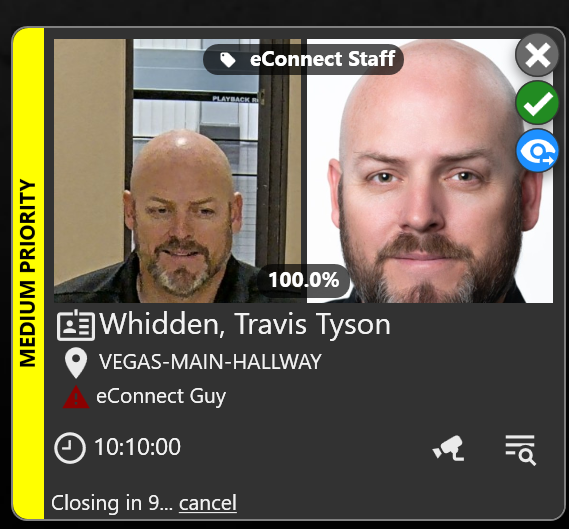
Transform the way you manage alerts with our comprehensive alert system overhaul. Stay in control even during high-pressure situations with intelligent features like "Auto Follow," which automatically launches camera feeds and follows subjects in real-time. Watch as Facial Recognition seamlessly tracks individuals across your property, with cameras dynamically switching to show the latest detections in a continuous loop.
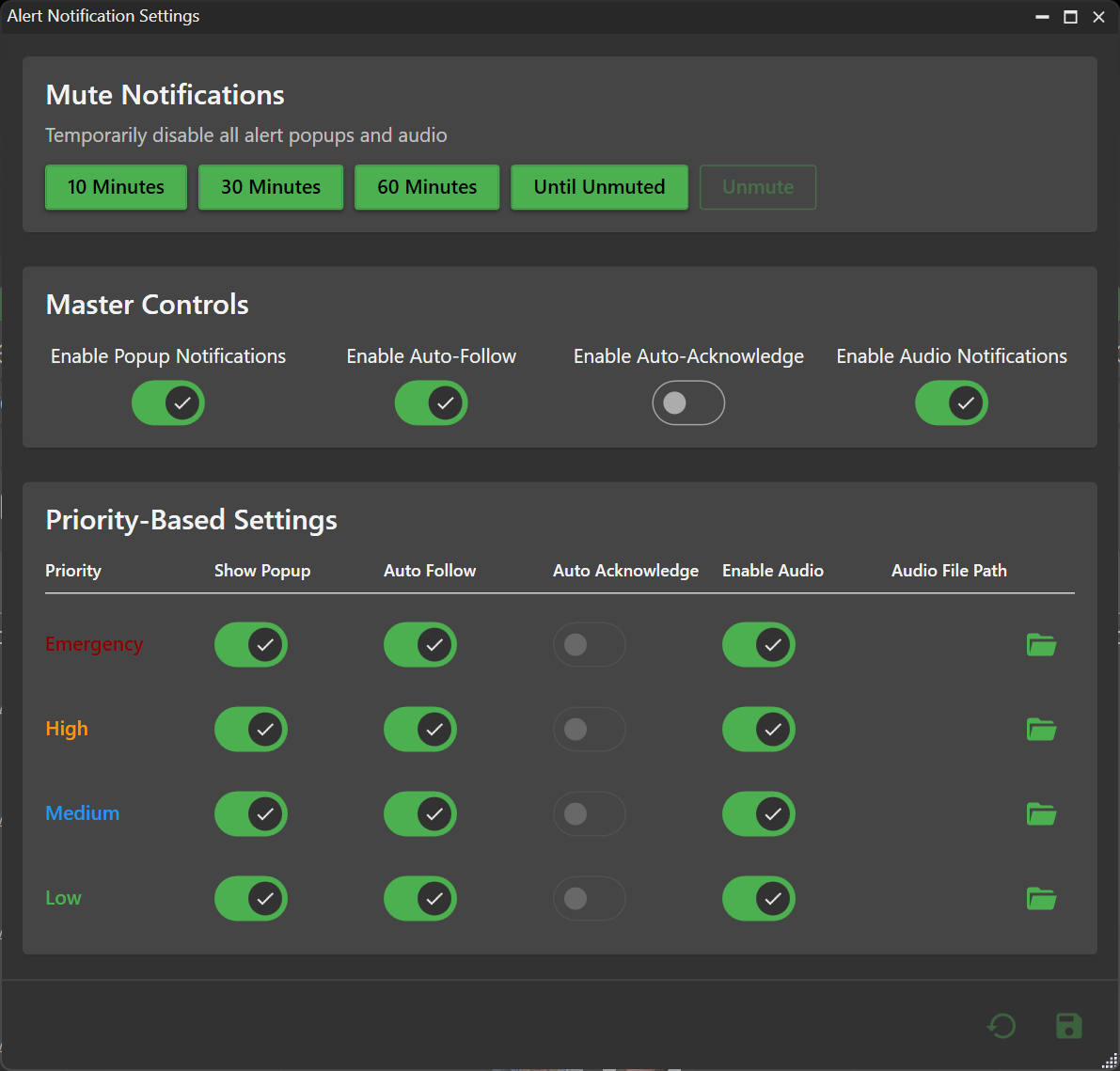
Take command with per-user alert settings: Enable Popups, Auto Follow, Auto-Acknowledge, and Audio Notifications tailored to your workflow.
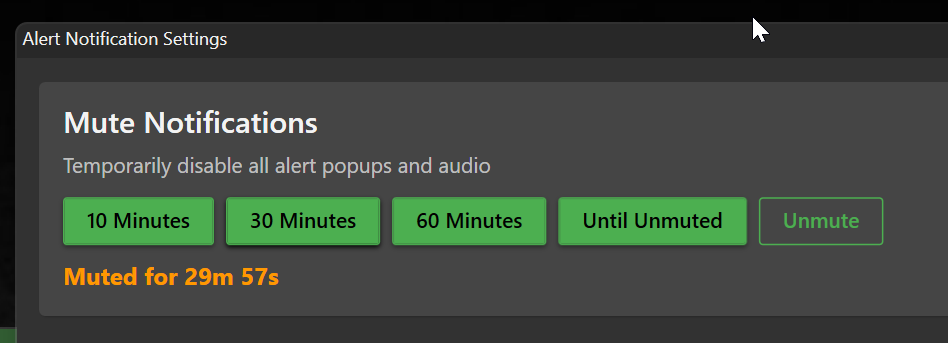
Need uninterrupted focus? Activate temporary mute for 30 minutes to suppress popups, auto-follow, and auto-engage features.
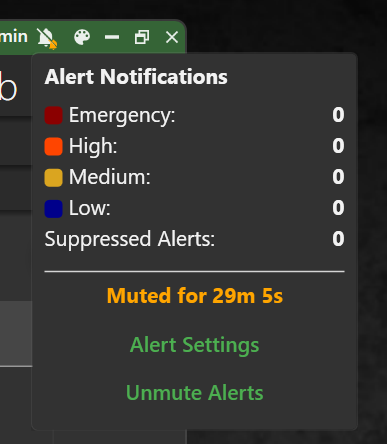
Monitor mute status and remaining time directly from the alert title bar.
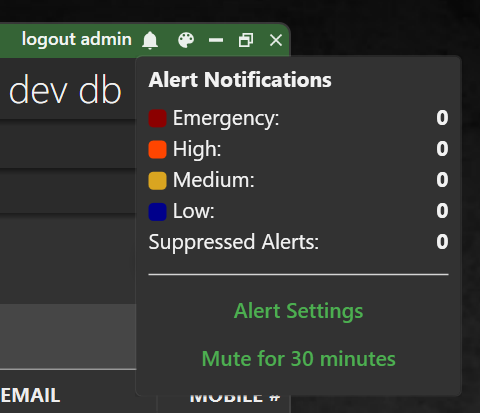
Navigate instantly to video evidence with the new follow icon to load the triggered alert right now.
Face Recognition Quality Assessment
Unlock the full potential of facial recognition with our advanced quality assessment tools. Now you can fine-tune search parameters to identify faces even in challenging, low-quality images. Whether it's grainy surveillance footage or imperfect uploads, our system adapts to find matches that were previously missed, expanding your investigative capabilities.
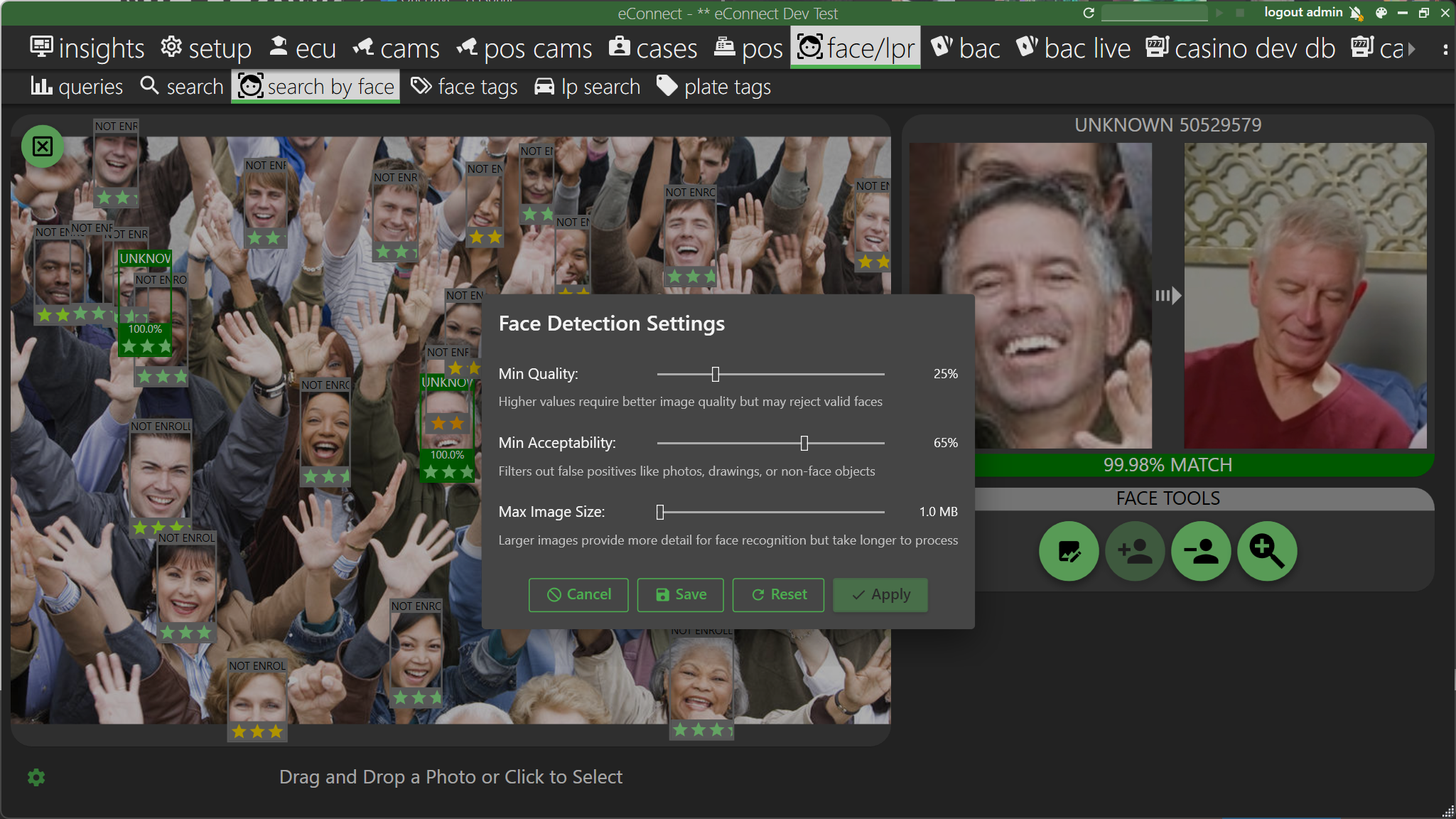
Visual quality indicators with star ratings provide instant feedback on image quality, helping you make informed decisions about enrollment and searches.
Association Graph Improvements
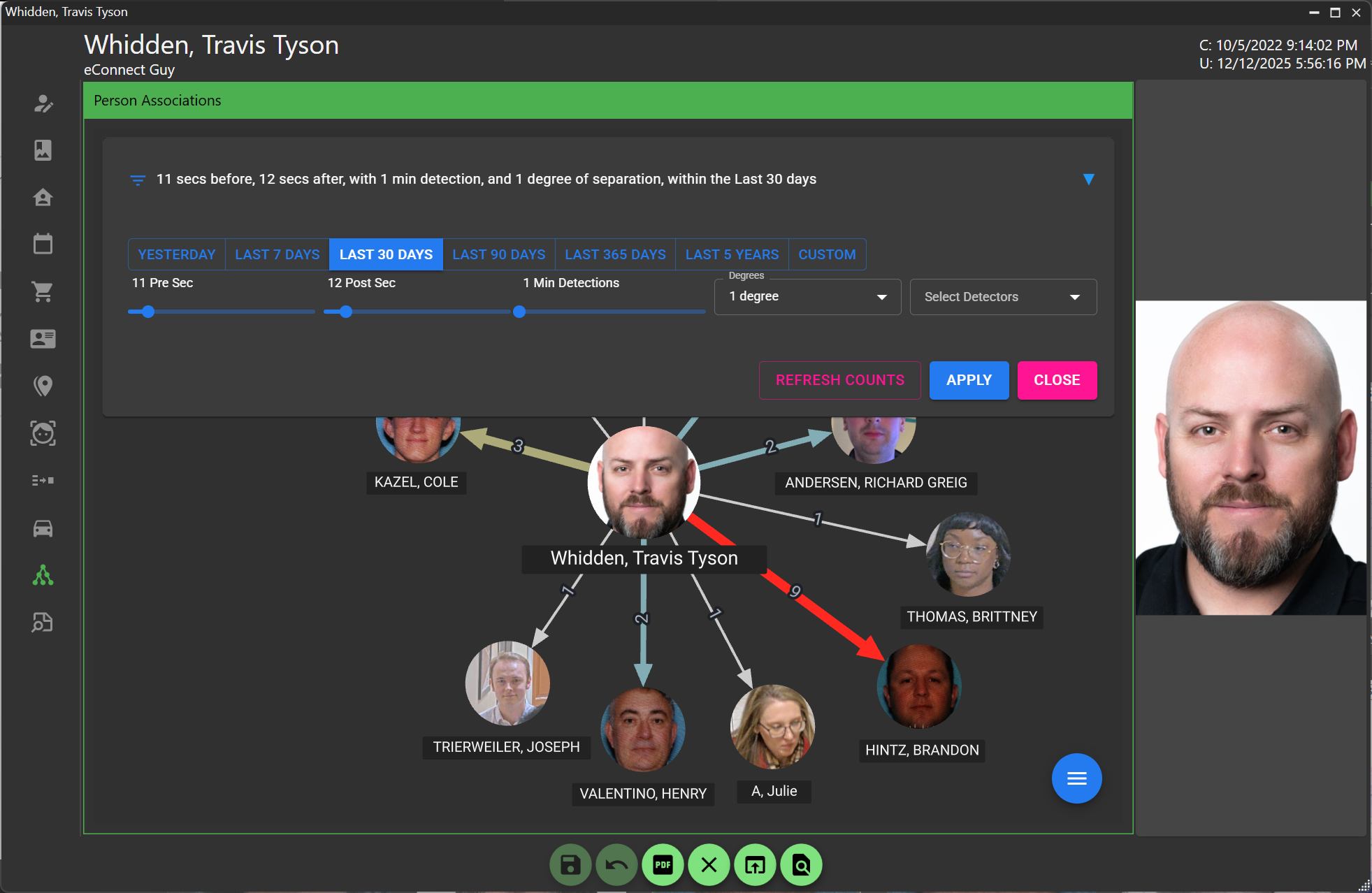
Dive deeper into connections with our enhanced association graphs. We've resolved the time period initialization bug, ensuring accurate data from the start.
Refine your investigations with the new "Refresh Counts" feature—adjust ranges and update connection counts without rebuilding the entire graph.
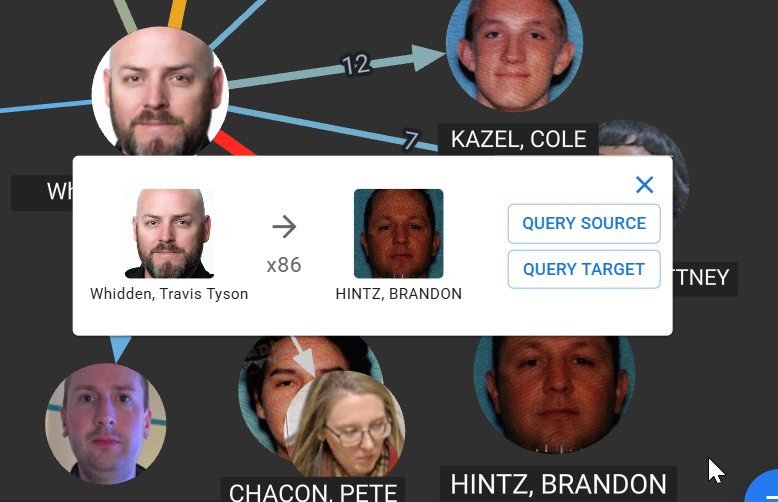
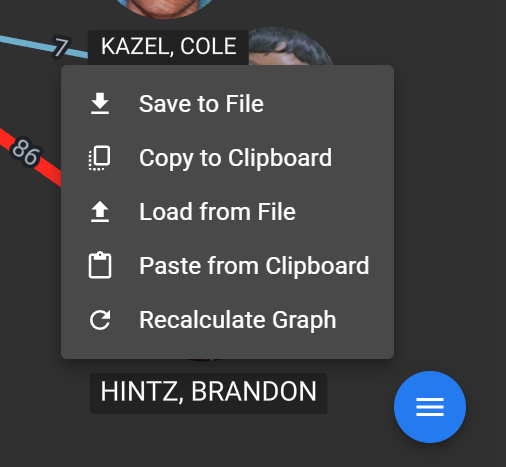
Right-click association lines to explore source and target detections, revealing the faces that forged each connection.
For complex investigations, save and restore graph layouts to maintain continuity across sessions and share insights with colleagues.
When graphs become cluttered, use "Recalculate Graph" to reorganize and optimize spacing without re-querying data.
Subject Printable PDF Reports
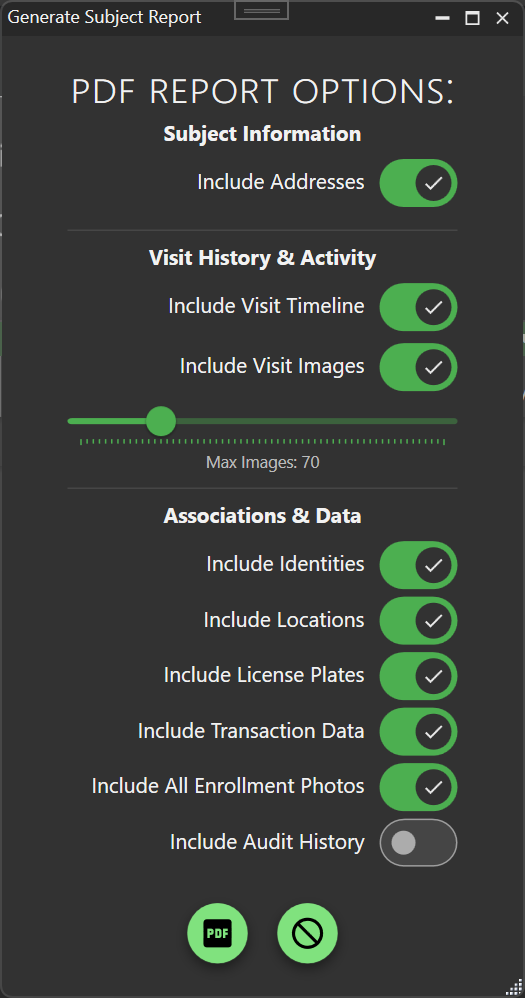
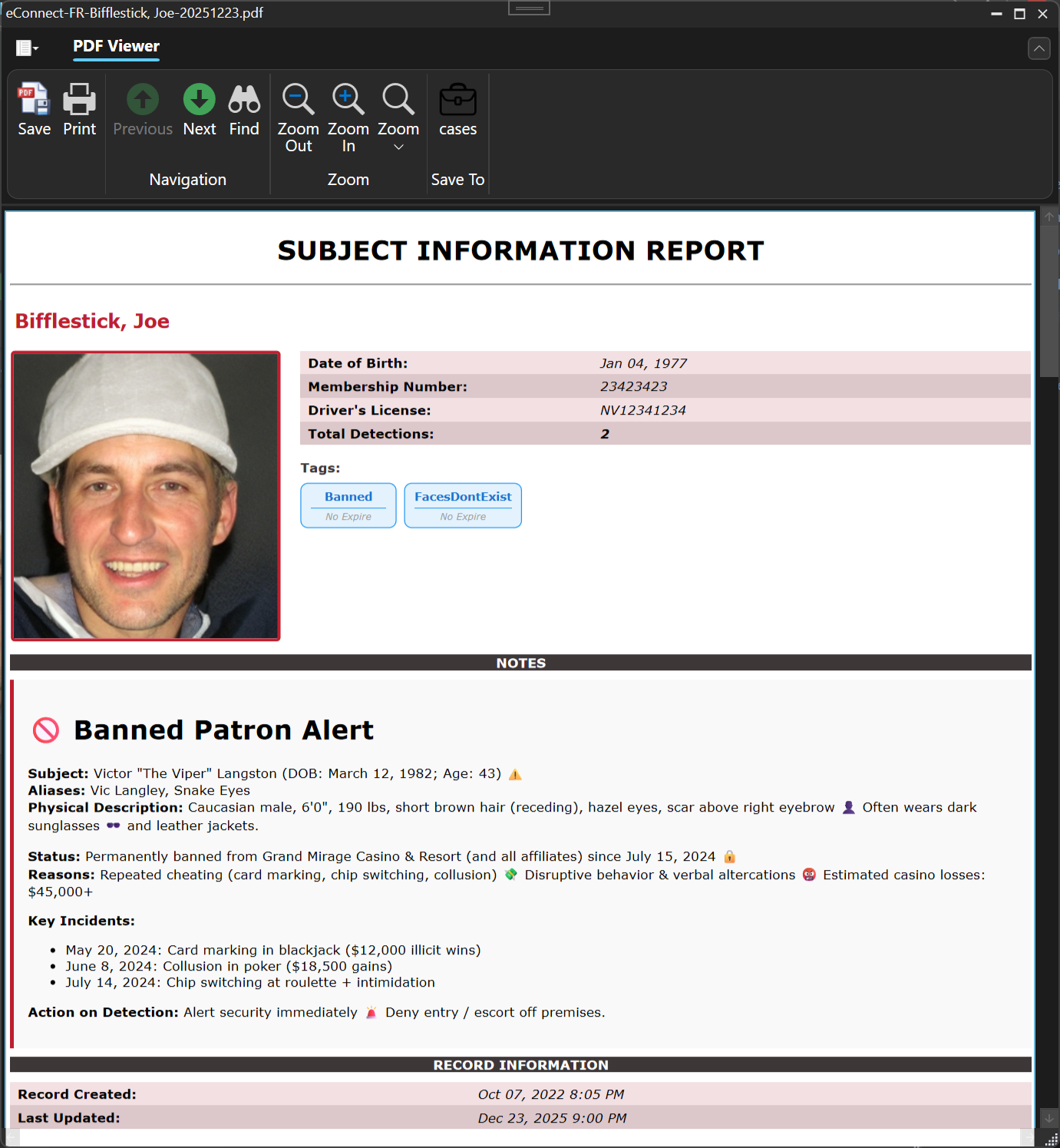
Generate comprehensive, customized PDF reports for subject profiles with ease. Select exactly which data points, visualizations, and insights to include, creating professional reports perfect for case files, briefings, or legal documentation.
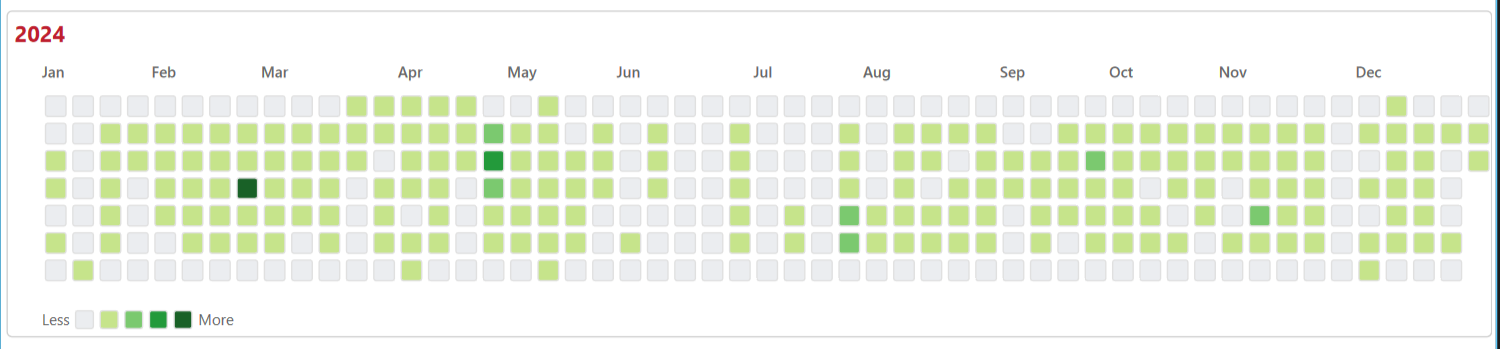
Visualize activity patterns with yearly heatmaps of visit history, providing clear insights into subject behavior over time.
Point of Sale Split Check Enhancements
Streamline Point of Sale operations with clickable hyperlinks in data grids and live check data. No more hunting for details—click directly on check numbers or items to access comprehensive transaction information instantly.

FaceRec Zones
Introducing Zones—a powerful new way to track how long employees, patrons, and other individuals spend at your property using Facial Recognition. Set up zones using cameras positioned at entry and exit points to automatically calculate visit duration, giving you clear, actionable insights into property traffic and subject behavior.
Zones support flexible camera configurations:
- Dedicated In/Out cameras for directional entry and exit tracking
- Bidirectional cameras that serve as both in and out detection points
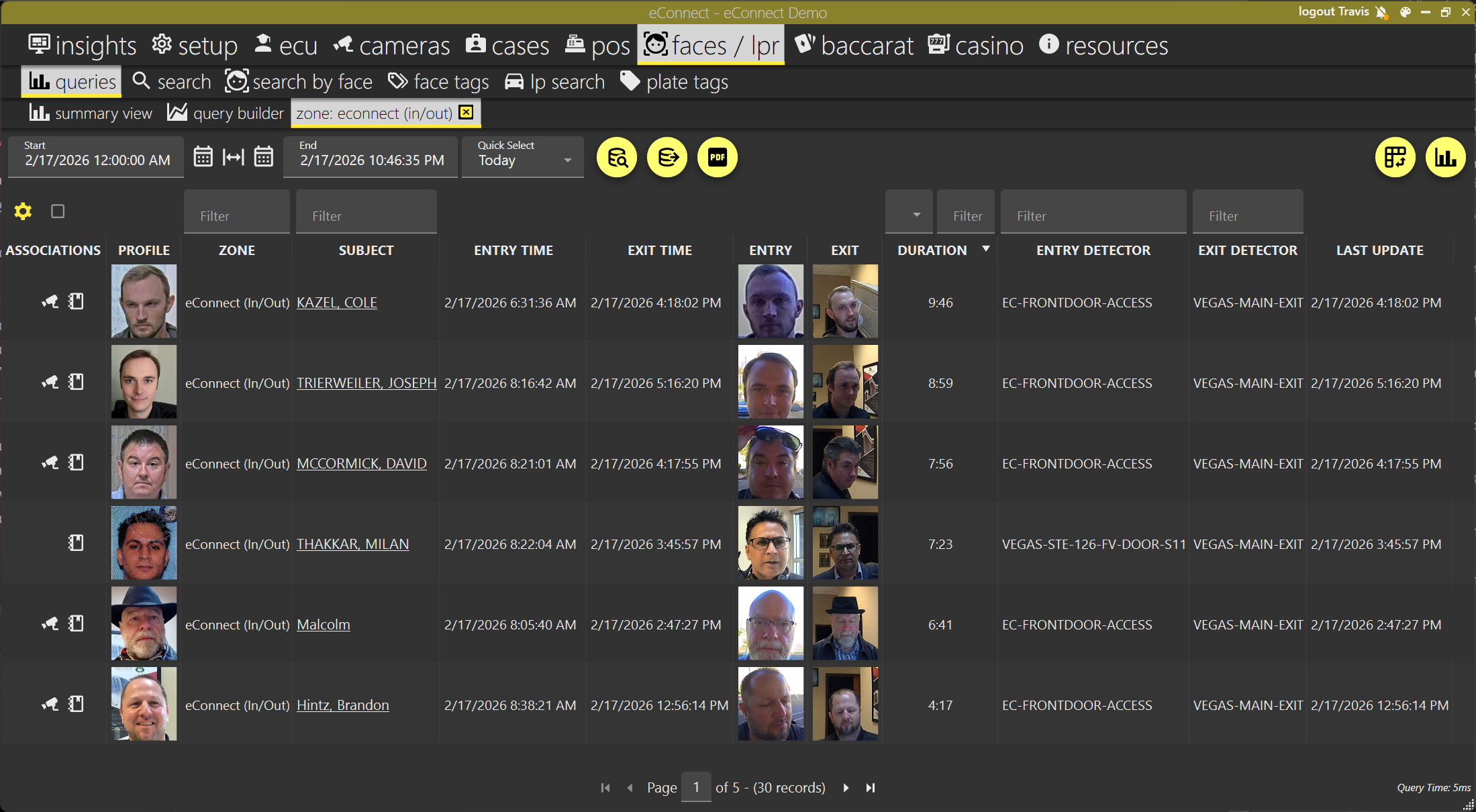
Generate PDF reports to document and share zone activity data, making it easy to review visit patterns for investigations, compliance, or operational reporting.
Custom Tag Expiration Options
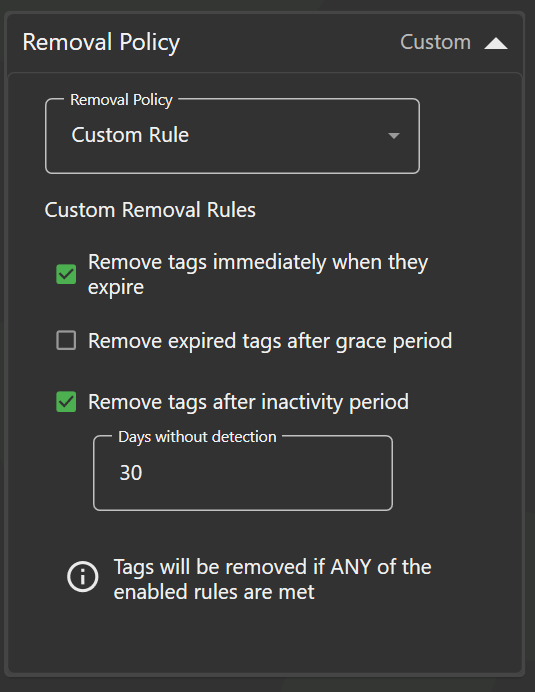
Take control of tag management with flexible expiration policies. Configure custom rules to automatically remove tagged visitors—like eScan tags—after periods of inactivity, keeping your database clean and focused on active subjects who may return.
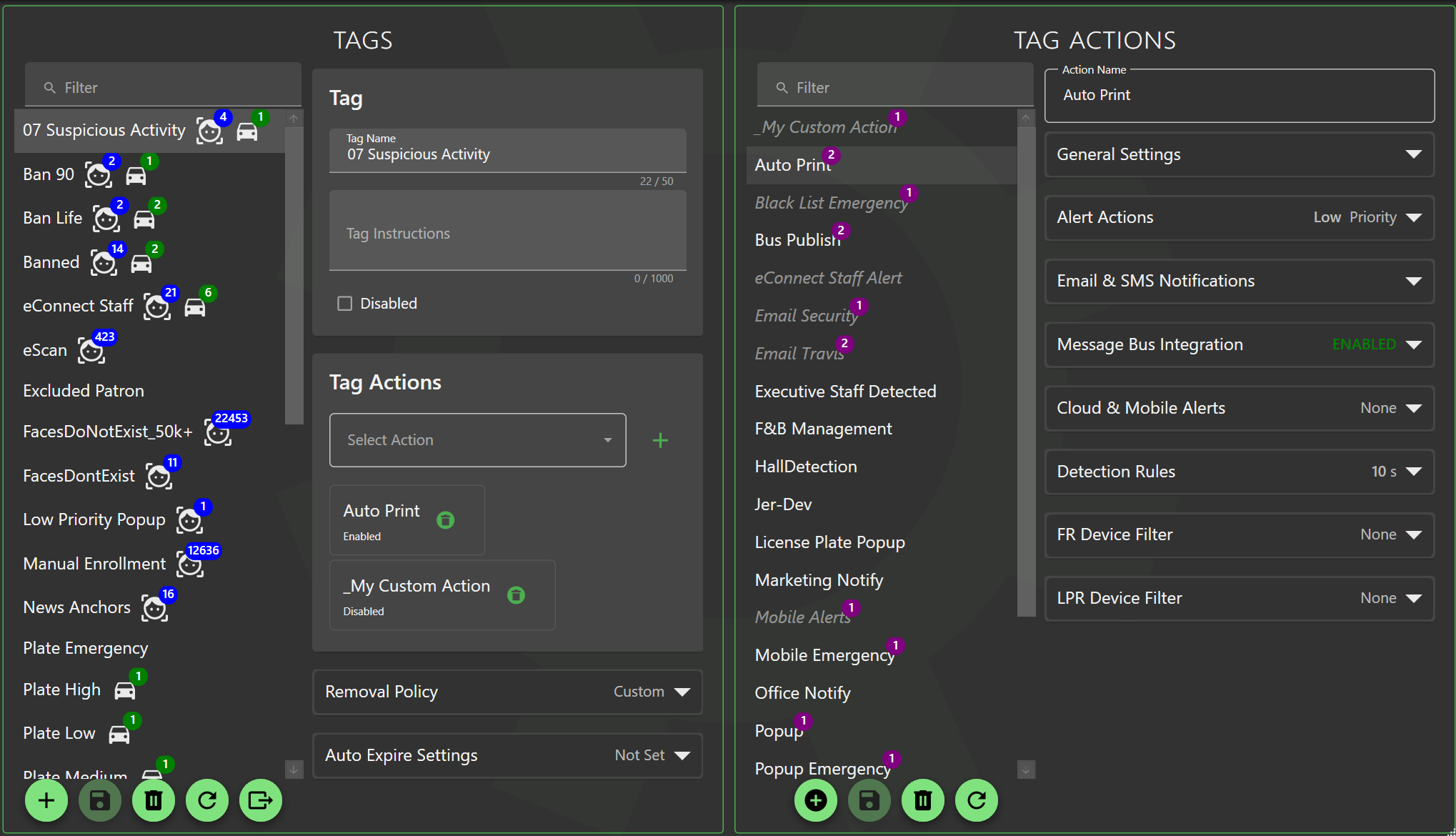
The Tag and Tag Action management pages have been refreshed with an improved interface, making it easier to edit tag data and configure actions.
Server Requirements
- Minimum OS: Windows Server 2016
- Minimum SQL Server: SQL Server 2016 SP1
- Minimum SQL Database Compatibility: Level 130
- Minimum eConnect Export Service: Version 5
All Changes
| Issue # | Title | Description | Type |
|---|---|---|---|
| 221 | FaceRec: Subject Printable PDF Report with selectable options | Added ability to generate printable PDF reports for subjects with customizable options for exporting detection data. | New Feature |
| 223 | Core: Dashboard render Human Readable Time in grid instead of seconds | Fixed dashboard grid to display time in human-readable format instead of raw seconds. | Bug |
| 256 | FaceRec/LPR - Tag & Notify Actions Include Details of changes | Tag and notify actions now record detailed changes in the audit log for better tracking. | Feature Enhancement |
| 272 | FaceRec: When enrolling additional enrollment photos to a profile, look for the largest / highest quality face in the photo, dont reject for multiple | Improved enrollment process to select the highest quality face from photos with multiple faces instead of rejecting them. | Customer Request |
| 274 | FaceRec/LPR: Add "Sort" to the Search Feature | Added sorting capabilities to search results in face recognition and LPR features. | Customer Request |
| 280 | Face/LPR: Option to filter detections by location - Multi-select combobox | Added multi-select combobox for filtering detections by location. | Feature Enhancement |
| 310 | POS: Hyperlink Split Check IDs to Check Details | Added hyperlinks on split check IDs to navigate directly to check details. | Feature Enhancement |
| 315 | FaceRec/LPR - Search Infinite paged searched | Implemented infinite scrolling for search results in face recognition and LPR. | Feature Enhancement |
| 327 | FaceRec: Associations Tab not applying correct time frame initially, resulting in false information | Fixed associations tab to properly apply selected time frames on initial load. | Bug |
| 328 | FaceRec: Face Enrollment close match may not force enroll when it should. SHIFT key to allow ultra-high probability match | Enhanced face enrollment to better handle close matches and added SHIFT key option for ultra-high probability matches. | Feature Enhancement |
| 329 | Core: Aggregate Summary API call with Unique Constraint will fail | Fixed API call failure related to unique constraints in aggregate summaries. | Bug |
| 330 | Core: Dashboard Import and Description Input Width fix | Fixed input width issues in dashboard import and description fields. | Bug |
| 331 | FaceRec: Address Conversion Service - Process in Batches to help prevent table locking | Improved address conversion service to process in batches, preventing table locking issues. | Bug |
| 332 | 10.3 - General Fixes and Maintenance | General maintenance and fixes for version 10.3. | Maintenance |
| 333 | FaceRec: Support Custom Identity Field Mappings | Added support for custom identity field mappings in face recognition. | Feature Enhancement |
| 334 | Core: Popup sometimes does not get a top-window, popups fall behind some applications | Fixed popup window behavior to ensure they appear on top and don't fall behind other applications. | Bug |
| 335 | FaceRec: Subject Birthdate is not removable if applied and incorrect or unknown; Ensure Valid Date. | Made subject birthdate removable and added validation for date entries. | Feature Enhancement |
| 336 | Core: Video Buffer Playback from Sequence Data supported - Define how far back to seek before the event of interest | Added support for video buffer playback with configurable seek distance before events. | Feature Enhancement |
| 337 | POS: Print Check Dialog in Dark Mode does not render text (white on white) | Fixed text rendering in print check dialog when using dark mode. | Bug |
| 338 | WebView2 - NoInlining - Help assist integrations where the wrong version of WebView2 may be installed, resulting in MissingMethodException | Added NoInlining to assist with WebView2 version compatibility issues. | Maintenance |
| 340 | Casino: Journal Table Missing Index - Performance resolution | Added missing index to journal table for improved performance. | Bug |
| 341 | Face/Lpr - Subject and Lpr Profile - Unsaved Changes - Prompt to save or discard | Added prompts for unsaved changes in subject and LPR profiles. | Feature Enhancement |
| 342 | FaceRec: Add Face Recognition Quality Assessment with Star Ratings and Configurable Detection Settings | Implemented visual quality assessment with star ratings and configurable detection parameters for face recognition. | Feature Enhancement |
| 343 | FaceRec: Associations - Stabilize nodes when resizing | Fixed node stability in associations view during resizing. | Bug |
| 344 | FaceRec: Associations - When person edits are applied, apply to association graph | Ensured person edits are reflected in the association graph. | Customer Request |
| 345 | FaceRec: Person Association Graph - Expand Search with Advanced Params | Enhanced search capabilities in person association graph with advanced parameters. | Feature Enhancement |
| 346 | FaceRec: Person Association Save/Restore Options | Added save and restore options for person association graphs. | Feature Enhancement |
| 347 | FaceRec: Person Association - Refresh Counts to prevent total rebuild | Added refresh counts feature to avoid full rebuilds in person associations. | Feature Enhancement |
| 348 | FaceRec: Person Association Graph Source/Target Detections on Edge | Added source/target detection information on association graph edges. | Feature Enhancement |
| 349 | FaceRec Fusion: SubjectMembers cannot be tracked because another instance with the same key value for MemberId is already being tracked | Fixed tracking issue with SubjectMembers in face recognition fusion. | Bug |
| 350 | FaceRec: Image Retry Option when image download fails | Added retry option for failed image downloads in face recognition. | Feature Enhancement |
| 351 | FaceRec / LPR - Do not apply Tag changes right away. Require Save Button | Changed tag updates to require explicit save action instead of immediate application. | Bug |
| 352 | Casino Iconic Associable - Include an Icon to Indicate Device or Location | Added icons to indicate device or location in casino iconic associations. | Maintenance |
| 353 | FaceRec: Subject Fusion to Transactions inconsistencies during bulk loading | Fixed inconsistencies in subject fusion to transactions during bulk operations. | Bug |
| 354 | Camera: MediaTubes1 Device Admin Background Colors | Fixed background color issues in MediaTubes1 device admin. | Bug |
| 355 | Casino: Ratings Readability | Improved readability of ratings table in dark mode. | Customer Request |
| 356 | FaceRec/Lpr: QueryTag API not including TimeZone Offset in results | Fixed QueryTag API to include timezone offset in results. | Bug |
| 357 | Core: Major Alert Changes; Now support different alert level; mute and temporary mute; Auto Follow features; Clear audio selections for different alert types; | Enhanced alert system with multiple levels, mute options, auto-follow, and audio selections. | New Feature |
| 360 | Core: Title Bar Window Double Click Maximize (Main and PopupWindow) | Fixed double-click on title bar to properly maximize windows. | Research Report |
| 366 | Casino: Rename "Slot Events" to "Device Events" since the table is more generic | Renamed "Slot Events" to "Device Events" for better generic applicability. | Customer Request |
| 369 | Baccarat: Text rendering in Statistics not respecting theme. | Fixed text rendering in Baccarat statistics to respect theme settings. | Bug |
| 370 | FaceRec: Demographics DataGrid - Include Address 1,2,3 | Added Address 1, 2, and 3 fields to demographics data grid. | Customer Request |
| 371 | Core: Fix to Session Timeout not logging user out. | Fixed session timeout to properly log out users. | Bug |
| 372 | FaceRec/Lpr: Tag Expire Custom Options; New Option; Visit Inactivity Expire | Added custom tag expiration options including visit inactivity expiration. | Feature Enhancement |
| 373 | FaceRec: Profile Search; allow user to select fields to search | Enhanced profile search to allow selection of specific fields to search. | Feature Enhancement |
| 374 | FaceRec: Added missing Membership Tier to Subject Profile | Added missing Membership Tier field to subject profiles. | Maintenance |
| 379 | Core: Dropped Microsoft Ready To Run (R2R) technology | Removed Ready To Run compilation after a false positive malware detection by certain virus scanners. | Maintenance |
| 383 | FaceRec: Confidence Rounding - Use Trim Instead of Standard Rounding | Changed confidence score rounding to trim instead of standard rounding, preventing artificially high 100% confidence results from values like 99.9999%. | Bug |
| 385 | FaceRec/LPR: Expanded Bulk Import Features | Extended bulk import functionality to support additional context data fields during import operations. | Feature Enhancement |
| 386 | FaceRec/LPR: Spell Check Added to Notes Section | Added spell check support to the Notes section in Face and LPR data entry to assist with accurate record keeping. | Feature Enhancement |
| 387 | FaceRec: Zones - Track In/Out Visit Duration | New Zones feature allowing setup of cameras to track entry and exit of individuals, calculating visit duration for employees and patrons. Includes PDF report support. | New Feature |
| 399 | FaceRec/Lpr: Merge Face and Lpr Detectors | Support consolidating Face and Lpr Detectors. Helpful with Detector renaming, uncluttering | Feature Enhancement |