Signal Bot User Guide
The eConnect Signal Bot is an AI-powered messaging assistant that integrates with Signal Messenger and eConnect facial recognition systems. It provides intelligent conversation capabilities, customizable face detection notifications, and powerful automation tools.
Key Features
- 🧠 AI-Powered Chat: Intelligent conversations using Grok AI
- 🖼️ Image Generation: Create images from text descriptions
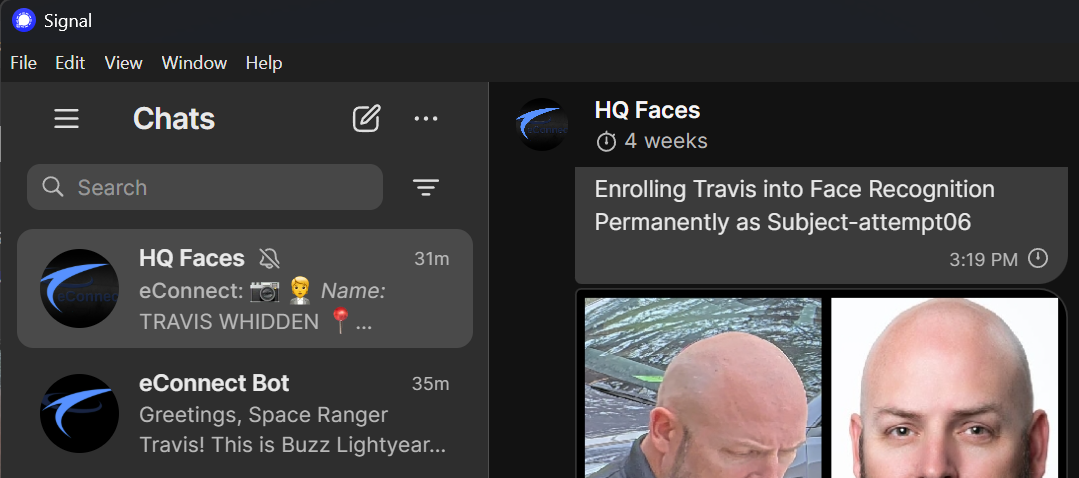
- 👤 Face Detection: Customizable notifications for facial recognition events
- 🛠️ Smart Tools: Natural language processing for complex tasks
- 📱 Group Support: Per-group settings and configurations
- 🔐 Secure: JWT-based authentication and encrypted communications
Getting Started
Adding the Bot to Your Group
- Your administrator will add the Signal Bot to your group
- The bot will introduce itself and provide basic instructions
- Type
/helpto see available commands and features - Use
@eConnect Botto start chatting with the AI!
The eConnect Bot is always listening for face detection alerts and will automatically post them to your group. However, for AI interactions, you must mention the bot using @eConnect Bot to get its attention. This prevents the bot from responding to every message in busy group chats.
First Steps
Once the bot is added to your group, you can immediately begin interacting with it using natural language. The AI is designed to understand context and provide helpful responses.
In group chats, you must mention the bot to get its attention! The bot is always listening but will only respond when directly addressed.
Use @eConnect Bot at the beginning of your message to interact with the AI.
Example first interaction:
User: "@eConnect Bot Hello, what can you help me with?"
Bot: "Hi! I'm your eConnect Signal Bot assistant. I can help with..."
AI Chat Features
Natural Language Interaction
The bot's primary interface is natural conversation. In group chats, simply mention @eConnect Bot followed by your message and the AI will respond intelligently.
Examples of what you can ask:
"@eConnect Bot Generate an image of a sunset over mountains""@eConnect Bot Create a face detection template for our office""@eConnect Bot Change my system instructions to be more casual""@eConnect Bot Summarize our conversation from today""@eConnect Bot What's the weather like in New York?"
[PLACEHOLDER IMAGE: Example AI Conversation in Signal]
AI Capabilities
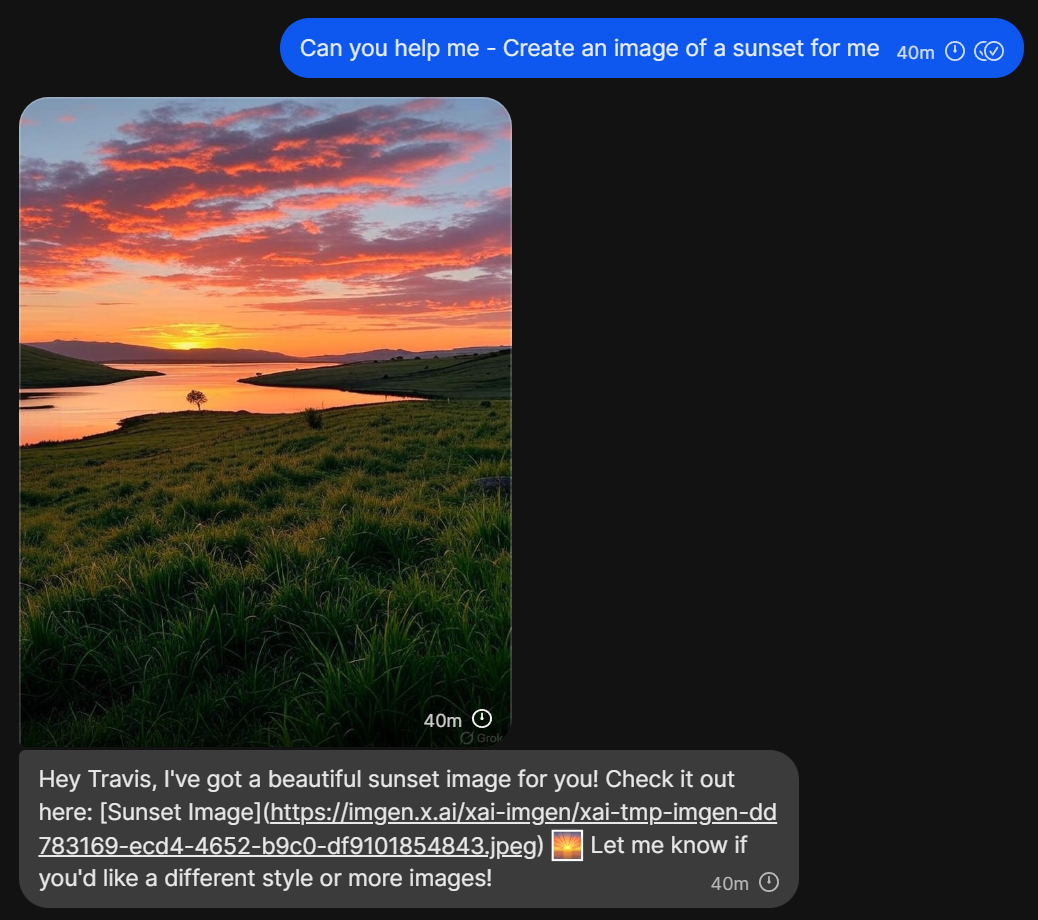
🎨 Image Generation
Create images from text descriptions, understand and analyze images you share, and generate creative visual content.
Example:
User: "@eConnect Bot Create an image of a futuristic cityscape at night"
Bot: Responds with an image generated
🔍 Live Search & Research
- Search the web for current information
- Provide up-to-date facts and data
- Research topics and provide detailed explanations
🧠 Reasoning & Analysis
- Analyze complex problems
- Provide step-by-step solutions
- Logical reasoning and decision support
💬 Conversation Management
- Maintain context across long conversations
- Summarize discussions
- Compress chat history to reduce token usage
Face Detection & Templates
Overview
The bot can receive face detection events from eConnect systems and send customized notifications to your Signal group.
Template System
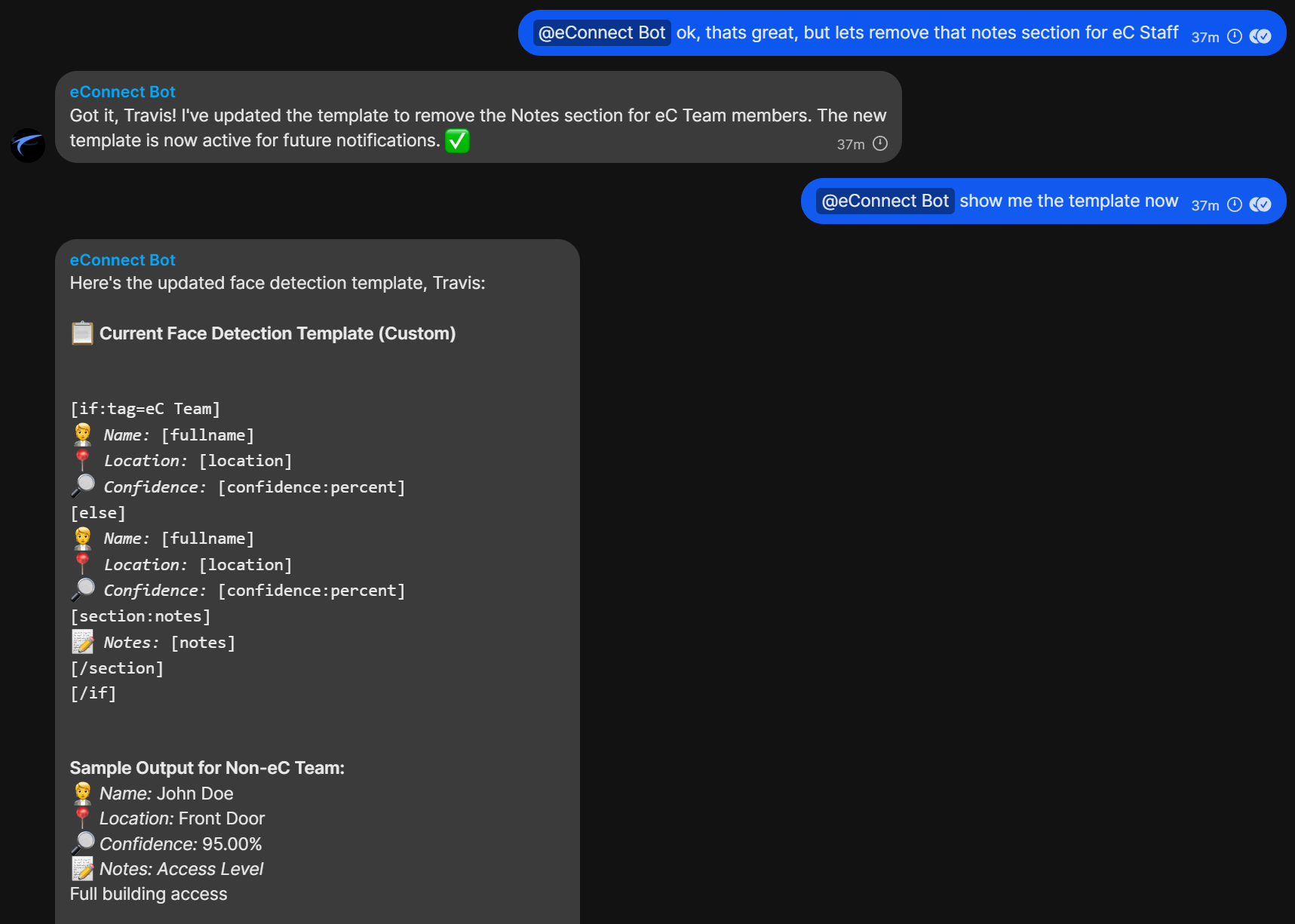
Face detection templates allow you to customize how recognition events are displayed. Templates use a special syntax with tokens that get replaced with actual detection data.
Available Tokens
| Token | Description | Example Output |
|---|---|---|
[fullname] | Full name of detected person | "John Doe" |
[firstname] | First name only | "John" |
[lastname] | Last name only | "Doe" |
[location] | Detection location | "Front Door" |
[time] | Detection time | "2025-08-26 14:30:00" |
[confidence:percent] | Confidence as percentage | "95.50%" |
[tags] | Person's tags | "VIP, Employee" |
[notes] | Associated notes | "Full building access" |
[custom:FIELD] | Custom field data | [custom:EMPLOYEE_ID] → "EMP001" |
Advanced Template Features
Sections (Conditional Display)
Only show content if the data exists:
[section:fullname]👤 Detected: [fullname][/section]
Conditionals
Show different content based on conditions:
[if:tags=VIP]🌟 VIP Member[else]Regular visitor[/if]
Switch Statements
Multiple condition handling:
[switch:tags]
[case:Priority 7]🚨 HIGH PRIORITY ALERT[/case]
[case:VIP]⭐ VIP Member[/case]
[default]Regular detection[/default]
[/switch]
Operators
=equals!=not equals>greater than>=greater than or equal<less than<=less than or equal~contains
Managing Templates with AI
Instead of memorizing template syntax, you can ask the AI to help:
Natural Language Examples:
"@eConnect Bot Create a face template that shows the person's name and location""@eConnect Bot Make a template for VIP alerts with special formatting""@eConnect Bot I want a simple template that just shows who was detected""@eConnect Bot Create a detailed template with confidence levels and custom fields"
The AI will generate the proper template syntax and set it for your group.
Bot Commands
Quick Reference
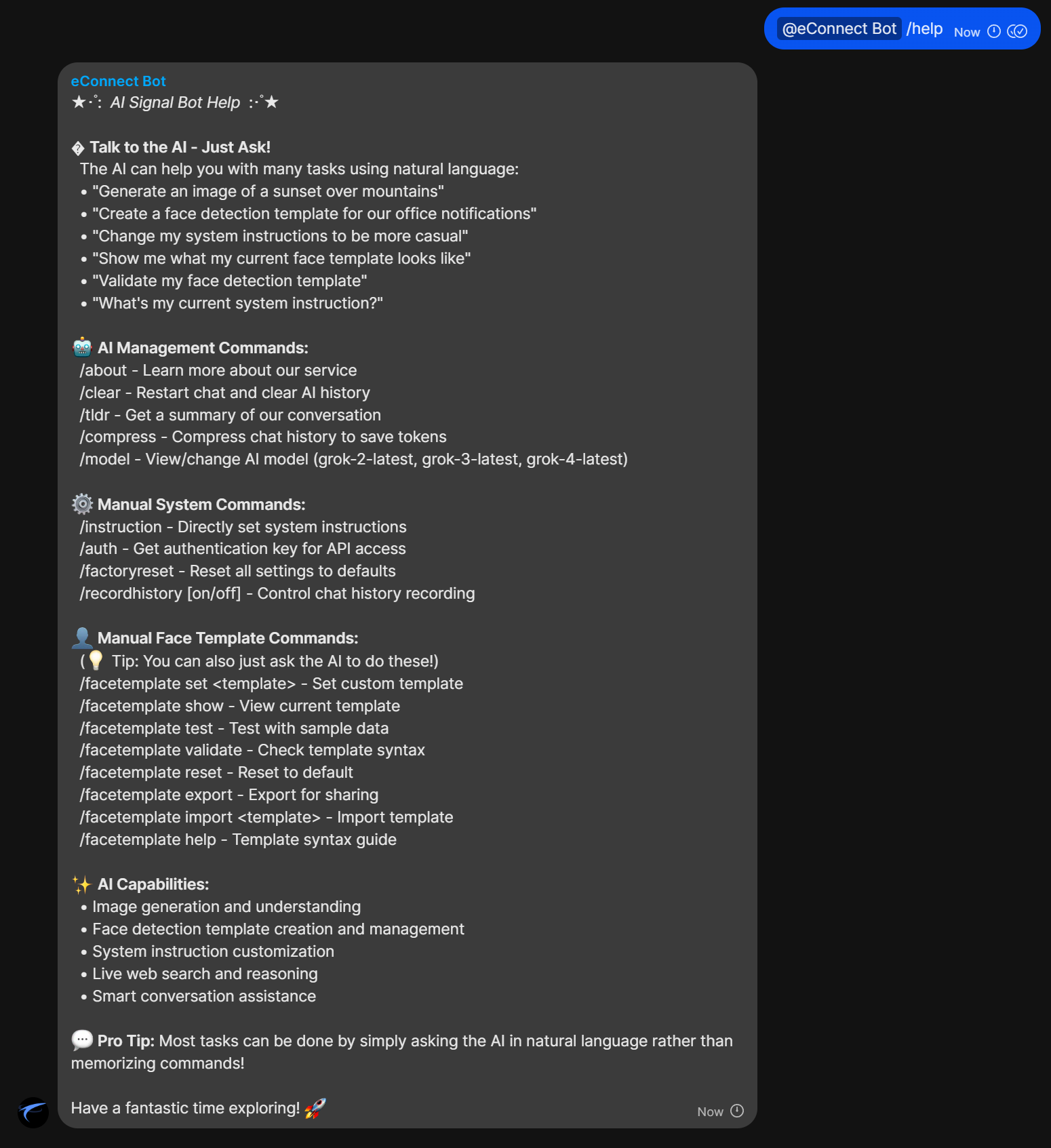
While you can do most things by talking to the AI (remember to use @eConnect Bot in group chats), these commands provide direct access to specific functions:
Commands can be used directly (e.g., /help) or with mentions (e.g., @eConnect Bot /help). Both work the same way in group chats.
🧠 AI Management
| Command | Description |
|---|---|
/help | Show help message |
/about | Bot information and version |
/clear | Clear chat history and restart conversation |
/tldr | Summarize the conversation |
/compress | Compress chat history to save tokens |
/model | View/change AI model |
⚙️ System Settings
| Command | Description |
|---|---|
/instruction | Set system instructions for AI behavior |
/auth | Get authentication key for API access |
/factoryreset | Reset all settings to defaults |
/recordhistory on/off | Control chat history recording |
👤 Face Templates (Manual)
| Command | Description |
|---|---|
/facetemplate set <template> | Set custom template |
/facetemplate show | View current template |
/facetemplate test | Test with sample data |
/facetemplate validate | Check template syntax |
/facetemplate reset | Reset to default |
/facetemplate export | Export for sharing |
/facetemplate import <template> | Import template |
/facetemplate help | Template syntax guide |
Command Examples
Setting System Instructions
/instruction Be casual and friendly, use lots of emojis
Changing AI Model
/model grok-4-latest
Setting Face Template
/facetemplate set 🚨 ALERT: [fullname] detected at [location] ([confidence:percent])
Advanced Features
Per-Group Settings
Each Signal group has independent settings:
- Custom face detection templates
- Individual system instructions
- Separate AI model preferences
- Independent chat histories
[PLACEHOLDER IMAGE: Group Settings Overview]
System Instructions
Control how the AI behaves by setting custom instructions:
Professional Setting:
"Act professionally, provide concise responses, minimal emojis"
Casual Setting:
"Be friendly and casual, use emojis, have fun conversations"
Technical Support:
"Act as a technical support specialist, provide detailed troubleshooting steps"
Model Selection
Choose from different Grok AI models:
grok-2-latest- Fast, efficient responsesgrok-3-latest- Balanced performance and capabilitygrok-4-latest- Most advanced reasoning and features
Chat History Management
- Recording: Enable/disable chat history storage
- Compression: Reduce token usage while preserving context
- Clearing: Start fresh conversations when needed
Authentication & Security
- JWT-based API authentication
- Secure webhook endpoints for face detection
- Group-isolated data and settings
Tips & Best Practices
🎯 Getting Better AI Responses
- Be specific in your requests
- Provide context when needed
- Ask follow-up questions for clarification
- Use natural language - no need to learn special syntax
🛠️ Template Creation
- Start simple, then add complexity
- Test templates before deploying
- Use the AI to help generate templates
- Consider your team's needs and preferences
📱 Group Management
- Set appropriate system instructions for your group's purpose
- Use
/tldrregularly in active discussions - Compress history when conversations get long
- Reset settings if behavior becomes unexpected
🔧 Performance Optimization
- Use
/compressto reduce token usage in long conversations - Clear history when starting new topic discussions
- Choose appropriate AI models for your needs
- Enable history recording only when needed
🎨 Creative Usage
- Use image generation for presentations
- Create visual aids for explanations
- Generate diagrams and illustrations
- Brainstorm with visual concepts
[PLACEHOLDER IMAGE: Creative Usage Examples]
Troubleshooting
Common Issues
Bot Not Responding
Symptoms: No response to messages or commands
Solutions:
- Check if the bot is online (send
/about) - Verify group permissions
- Try
/clearto reset the conversation - Contact your administrator
Face Detection Not Working
Symptoms: No face detection alerts in Signal
Solutions:
- Verify webhook configuration
- Check template syntax with
/facetemplate validate - Test with
/facetemplate test - Ensure authentication tokens are valid
AI Responses Seem Off
Symptoms: Unusual or inappropriate AI behavior
Solutions:
- Check system instructions with natural language query
- Try
/factoryresetto restore defaults - Clear conversation history with
/clear - Verify the correct AI model is selected
Commands Not Working
Symptoms: Commands don't execute or show errors
Solutions:
- Ensure commands start with
/ - Check spelling and syntax
- Try using natural language instead
- Use
/helpto verify available commands
[PLACEHOLDER IMAGE: Troubleshooting Flowchart]
Getting Help
Within the Bot
"@eConnect Bot I need help with face detection templates"
"@eConnect Bot How do I change my system instructions?"
"@eConnect Bot What commands are available?"
"@eConnect Bot Show me how to create an image"
Command Help
/help                  # General help
/facetemplate help     # Template syntax guide
/about                 # Bot information
Admin Support
Contact your system administrator for:
- Bot configuration issues
- Group permission problems
- Webhook setup problems
- Authentication issues
Version Information
This guide is for eConnect Signal Bot v2.x and later. Features and commands may vary in older versions.
Current Capabilities:
- Grok AI Integration (v2+)
- Advanced Face Templates (v2+)
- Image Generation (v2+)
- Natural Language Processing (v2+)
- Multi-Group Support (v1+)
- Webhook Integration (v1+)
For technical documentation and setup instructions, see the developer guides.