Relay Ingest
Relay Ingest lets an Identities server receive face detections from somewhere else and record them as if its own cameras had captured them. The sender is usually another site's Events Bridge, which needs no code at all. It can also be any system of your own that has face snapshots and, optionally, person details.
Each accepted detection becomes a native detection on the receiving server:
- the snapshot is stored in the receiver's Face Recognition with the original capture time;
- it appears on the Live Monitor and in the person's detection history;
- it is published on the Identities bus, so subscribers, Events Bridge WebHooks and automations see it like any local detection;
- the person's names, tags, custom fields and notes are merged into the receiver's profile by per-source rules.
Relay Ingest is available from Identities 0.23.0.
When to Use It
- A corporate or regional Identities that aggregates detections from several properties.
- A demo or test system fed with real detections from a live site.
- Your own system pushing face sightings, with whatever it knows about each person, into Identities.
To publish faces from an edge detector you run against the receiver's own cameras, use Face Edge instead. Relay Ingest is for detections that were already made somewhere else.
How It Fits Together
Step 1: Get Credentials
An administrator of the receiving Identities creates a source for each sender under Setup → Integration → Relay Ingest. Creating a source shows three values, once:
| Value | Example | Used as |
|---|---|---|
| Postback address | https://customername.econnectcloud.com/identities/api/v1/relay-ingest/face | The URL you POST to. |
| Key ID | ABCD2345 | HTTP Basic username. 8 characters, A–Z and 2–7. Public. |
| Secret | 43 characters, base64url | HTTP Basic password. Keep it private. |
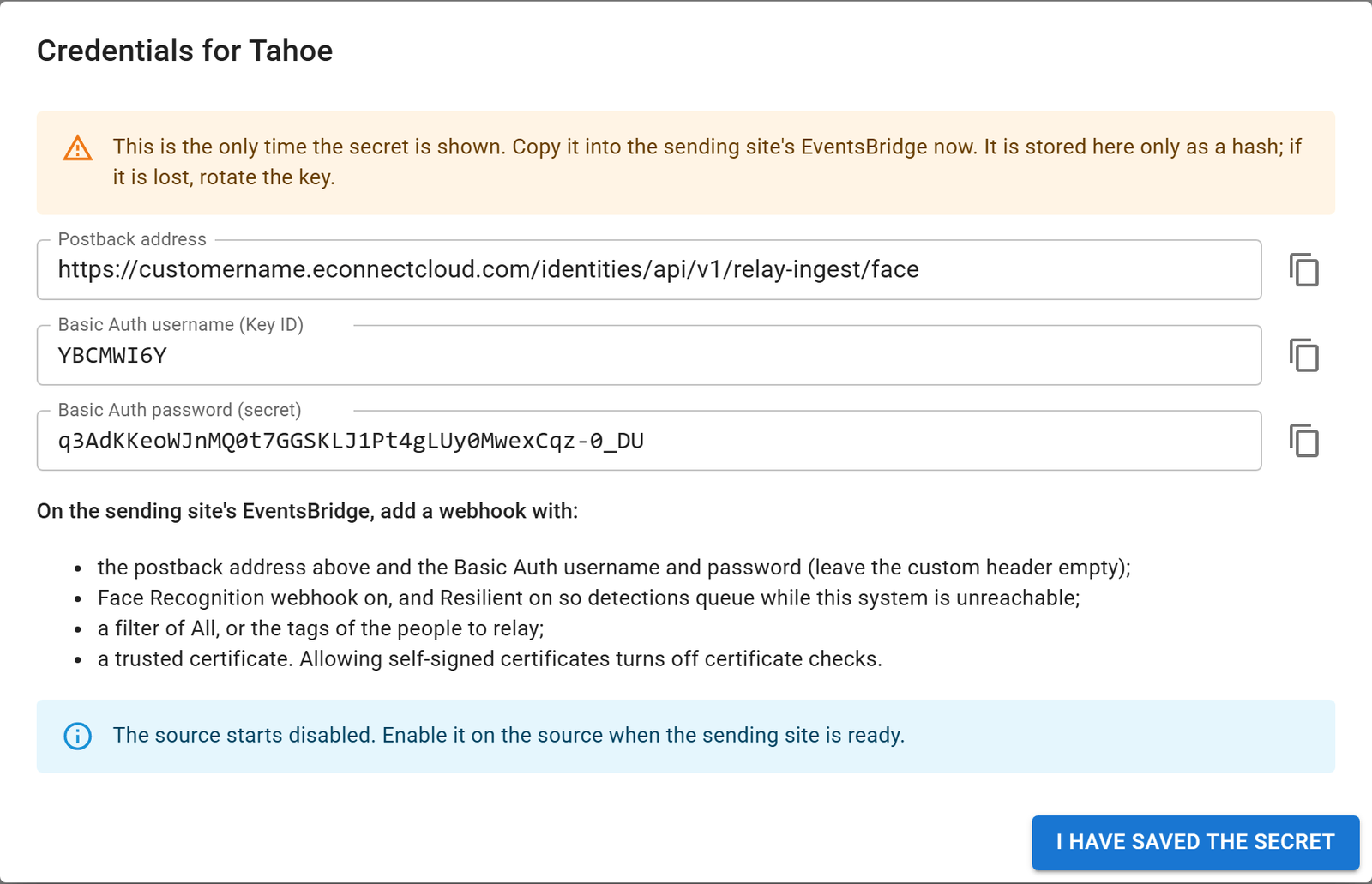
The receiver identifies the sender only by these credentials. Nothing in the request body is trusted for identity. A new
source starts disabled, and the Relay Ingest module itself must be switched on. Until both are on, every request is
refused with 403. The administrator's side is described in the user guide:
Relay Ingest.
Step 2: Send Detections
Option A: Events Bridge WebHook (no code)
On the sending site, add a WebHook in Events Bridge. Events Bridge already sends exactly the body Relay Ingest expects.
| Events Bridge field | Value |
|---|---|
postbackAddress (Web Hook Address) | The postback address. |
authBasicUserName | The Key ID. |
authBasicPasswordDecrypted (Basic Password) | The secret. Events Bridge encrypts it on save and never shows it again. |
headerKey / headerValue | Leave empty. |
webHookFaceRec | true |
resilient | true |
maxRetryAttempts | Above 0 (for example 60), ideally with useExponentialBackoff: true. 0 disables retries even when resilient is true. |
filterRules | All, AnyTagged or SpecificTags. Expected sends only people a partner enrolled through Events Bridge's own API. |
serverPermitSelfSignedCerts | false. Use a trusted certificate: turning certificate checks off exposes the credentials. |
disabled | false |
See Create or Update a WebHook to do this through the Events Bridge API, or Manually Setting Up a WebHook to use its screen.
Option B: Your Own Sender
Send one detection per POST to the postback address. The full contract is on
Relay a Face Detection. In short:
- Authenticate with HTTP Basic: Key ID as the username, secret as the password. No JWT and no login call.
- Send a JSON body with at least
payload.detectionInfo.dateTimeUtcandpayload.detectionImage.image(a base64 JPEG snapshot containing the face). - Add person details in
payload.personInfo(names, tags, fields or notes). Without any of them the detection is unknown and is ignored unless the source records unknown faces. - Give each person a stable, globally unique
personInfo.faceId(a GUID), and each detection a uniquedetectionInfo.detectId. Keep both the same when you retry. - Treat every
200as final and read itsoutcome. Retry only503(and network failures), with backoff. Never retry403: fix the credentials or configuration instead. - Send one request at a time, or only a few in parallel. By default the receiver processes 4 at once and answers the
rest with
503 Busy.
What the Receiver Does With Each Detection
The receiver runs these steps in order and stops at the first one that decides the outcome.
- Authenticate. Look up the source by Key ID and check the secret. A missing, unknown, wrong or disabled credential,
or the module switched off, returns
403. If the receiver's detection recording is off, or it is already processing its maximum number of requests, it returns503so the sender keeps the detection and retries. - Validate.
dateTimeUtcand a non-emptydetectionImageare required. Empty image arrays count as missing, and amiddleNameequal tolastNameis dropped. - Classify. A detection is known if it carries any name, tag, field or note, and unknown otherwise.
- Resolve the expected person. First the face link: a
personInfo.faceIdthis receiver has linked before maps straight to the local person. Otherwise the receiver runs a face search ondefaultPhoto, then ondetectionImage, and uses the largest face. - Duplicate guard. See Duplicates, Retries and Loops.
- Prepare the person (known detections only). An existing person is updated by the source's merge rules. With no existing person, a new profile is created under a process-wide lock, so two simultaneous first sightings cannot create two profiles. If the face search found a local Unknown, that face is promoted. If enrolling the photo shows it belongs to someone already here, that person is used instead. The source's own tags are applied and the face link is saved.
- Replay. The
detectionImageis published into the receiver's Face Recognition with the original capture time and the camera name<camera prefix><detectorName>. Face Recognition stores it, matches it and publishes the live detection that Identities records natively.
Step 6 runs before step 7 on purpose: even the first relayed sighting of a new person reaches the Live Monitor and the bus with a name and tags, not as an Unknown.
One Person, One Profile
The receiver never creates a second profile for a person it already knows. It finds the person through the face link, a face search, or the "already enrolled" result of enrolling the photo, in that order.
Face Recognition still matches every replayed snapshot independently, just as it matches camera frames. It can therefore
file a relayed detection under a different face than the expected person's. When that happens the detection stays where
Face Recognition put it. The response reason contains MatchedAnotherFace and the admin page counts it, so staff can
review and merge. The receiver never merges profiles automatically.
Duplicates, Retries and Loops
A detection is a Duplicate when either of these is true:
- its
detectionInfo.detectIdwas received in the last hour, or - the expected person already has a detection whose capture time is within the duplicate window (default 1 second,
configurable 0–5) and whose camera name matches, meaning one name ends with the other, ignoring case. A local
Lobbymatches an incomingTahoe - Lobby, and the reverse.
Every hop keeps the capture time exactly and only prepends to the camera name. This single rule therefore catches sender retries, the same detection arriving by two routes, a site posting to itself, and loops of any length (A → B → A, A → B → C → A). It works because the receiver's own Events Bridge WebHooks forward relayed detections like any others.
detectId, not messageIdRelay Ingest ignores the Events Bridge messageId and resentEvent fields. A custom sender gets retry safety by
reusing the same detectId and dateTimeUtc on every attempt.
Unknown Faces
Each source decides what happens to unknown detections:
- Ignored (default): the response is
200withIgnoredUnknown, and no Face Recognition call is made. - Recorded: the snapshot is replayed with no profile work. Face Recognition matches it to an existing face or keeps it as a new Unknown, which staff can promote. If the same face later arrives with details, a profile is created then and linked to that face.
Merge Rules
Each source has four merge rules for people the receiver already has. A person the relay creates always receives every detail.
| Category | Options | Default |
|---|---|---|
| Names (default alias) | Never · FillMissing · Overwrite | FillMissing |
| Custom fields | None · FillMissing · Overwrite | FillMissing |
| Notes | None · AppendNew | None |
| Tags from the payload | None · Add | None |
Empty incoming values never erase anything, tags are never removed, and notes are only appended. Custom fields are matched to the receiver's fields by the source's field map, then by identical field ID, then by the receiver's friendly field name. Unmatched fields are skipped, never created. Every option is explained in the user guide under Merge Rules.
Changes are written to the audit log under Relay: <source name>. A merge failure (a tag service error, for example)
never blocks the sighting: the detection is still recorded and the response reason contains MergeErrors:N.
Server Settings
These are set in the receiving server's configuration (appsettings.json or environment variables), not on the admin
page.
| Setting | Default | Purpose |
|---|---|---|
FaceRecognitionEvents:Record | true | Must be true. While it is false the endpoint returns 503 RecordingDisabled, and the module cannot be enabled. |
FaceRecognitionEvents:PublishMaxAgeHours | 24 | Detections older than this are stored but not published on the Identities bus. 0 means no limit. Raise it to pass a sender's backlog through after an outage. A sending Identities whose Events Bridge uses the bus transport needs the same change to send its backlog at all. |
RelayIngest:MaxConcurrentRequests | 4 | Requests processed at once. Further requests get 503 Busy. |
RelayIngest:RequestTimeoutSeconds | 30 | Time budget for one detection (face search, enrollment and replay). Exceeding it returns 503 Timeout. |
Limitations
- Faces only. License plate payloads (
WebHookLprPayload) are not accepted. - Time zone. Face Recognition ignores the submitted
timeZone, so a relayed detection carries the receiver's time zone.dateTimeUtcis exact. - Detector type. Face Recognition labels relayed detections as live-stream detections. The camera prefix tells them apart.
- Maintenance mode. While the receiver's Face Recognition is in maintenance mode it finds no faces. Those detections
return
RejectedNoFaceand are not retried. - Duplicate window. A genuine second sighting of the same person, on two cameras whose names end the same way, within the window, is treated as a duplicate.
- One way. Nothing is sent back to the sender, and Relay Ingest does not forward detections onward by itself.
Next Steps
- Relay a Face Detection: the endpoint, request body, responses and code examples.
- Face WebHook: the Events Bridge payload this endpoint accepts.
- Relay Ingest user guide: sources, keys, rules and live activity for administrators.